Automate Klaviyo Integration with ConnectMagic Webflow App
Send Webflow store, form and visitor data to Klaviyo for marketing workflows.
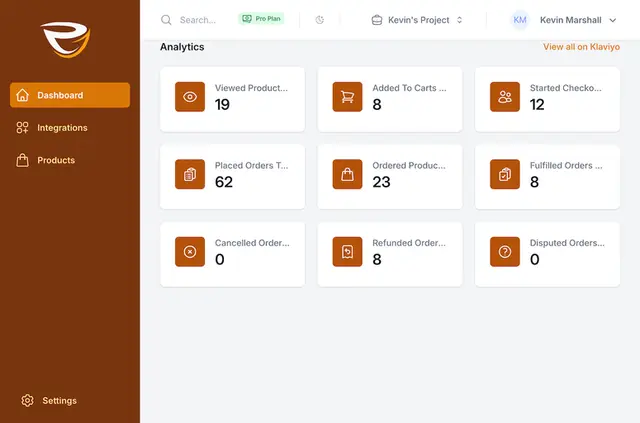
Without ConnectMagic, you may need to move Webflow customer and store activity into Klaviyo by hand or rely on extra tools. Once installed, it sends that data between the services for use in marketing workflows.
Data includes Ecommerce orders and product information, abandoned-cart email addresses captured during checkout, visitor activity, and native Webflow form entries with customer details and custom fields.
Who gets the most out of it
ConnectMagic suits Webflow Ecommerce businesses that use Klaviyo for email marketing. You can use synced customer actions to build segments and automated campaigns, drawing on store activity, site visits and form entries.
Access and pricing
ConnectMagic is a paid app. When you install it, it can edit custom code and read forms, Ecommerce, sites, site settings, app subscriptions and your user profile.
Limits to know
Installation instructions and documentation cover connecting a Webflow Ecommerce site with Klaviyo. The app connects these two services for marketing data workflows.
Questions about ConnectMagic
Who is the developer behind ConnectMagic?
ConnectMagic is made by Ristretto Apps.
Can I use ConnectMagic on an Ecommerce site?
Yes. It transfers Webflow Ecommerce order events and product information to Klaviyo, and captures abandoned-cart email addresses during checkout.
How do you install ConnectMagic in Webflow?
Use the installation instructions and documentation to connect your Webflow Ecommerce site with Klaviyo.
Can ConnectMagic send native Webflow form submissions to Klaviyo?
Yes. It sends submissions with customer details and custom fields to Klaviyo.
Can I use Webflow visitor activity in Klaviyo?
Yes. ConnectMagic tracks activity on your Webflow site and sends it to Klaviyo for marketing workflows.