Efficiently Enhance Webflow Projects with Placeholder Bae Webflow App
Fill Webflow CMS mockups with project-specific sample copy and images generated for your collection.
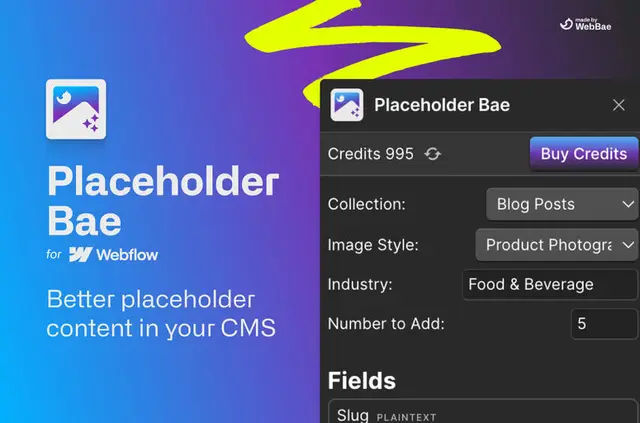
When you need believable content in a Webflow mockup, Placeholder Bae generates sample text and images for a collection you select. It uses the field types to guide what it creates, so the material can suit the structure of your project.
Set an industry template and image style to steer the results. New users get 10 AI credits, and each request can cover as many as 10 collection items.
Getting started in Webflow
Install Placeholder Bae, then choose the Webflow CMS collection you want to populate. The app generates placeholder content for that collection’s items, working across its fields.
Keegan Leary made the app. It offers a free option as well as paid plans.
When it's a good fit
Use it when preparing a realistic mockup for a client proposal or collecting design feedback. Teams can give CMS items sample material that reflects the project, rather than leaving the design filled with generic filler.
It is particularly relevant when your design work relies on Webflow CMS collections, since generation is based on the fields in the collection you choose.
Feature notes
You can shape generated material with these options:
- Create text and images in bulk across CMS fields.
- Use field types to guide the content generated for each field.
- Apply industry templates to tailor sample material.
- Select image styles; images are chosen or generated to suit your project’s context.
Placeholder Bae FAQ
How many collection items can one request cover?
A request can generate content for up to 10 items.
How does the app handle images?
You can choose an image style, and the app selects or creates images suited to your project’s context.
What permissions does Placeholder Bae request?
It requests permission to modify CMS content. It also asks to view your sites, workspace, app subscriptions and profile.
What credit allowance do new users get?
New users receive 10 AI credits.
What do Patreon members get?
Patreon members receive 100 complimentary credits when they install the app. They also get earlier access to upcoming features and tutorials.