Effortlessly Design Multi-Step Forms with Inputflow Webflow App
Build multi-step Webflow forms that guide visitors through questions, choices and calculated outcomes.
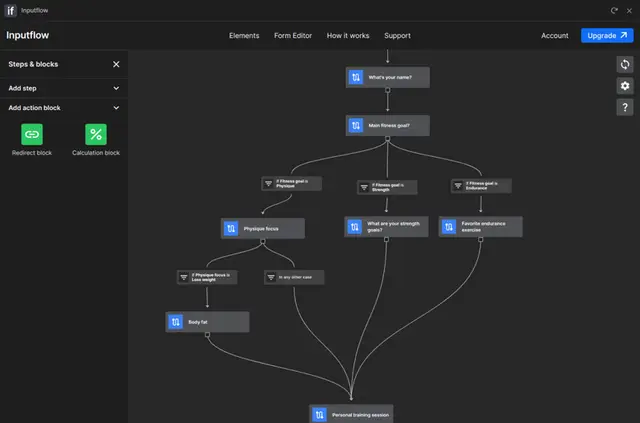
Use Inputflow for Webflow forms supporting onboarding, pricing, lead generation, orders, signups or configurators. You build and style the form in Webflow, then connect its steps and configure how it behaves in Inputflow.
Send visitors down different paths based on earlier answers, calculate a price or score from their entries, and display success messages suited to their input.
The main tools
- Direct visitors to different form steps based on their previous answers.
- Set field validation and create custom error messages for invalid entries.
- Calculate a result, such as a price or score, using submitted values.
- Show a success message that varies according to the visitor’s answers.
- Apply an active class to chosen radio buttons or checkboxes, and advance the form when a radio option is selected.
Limits to know
You design the form layout and styling in Webflow, while Inputflow connects the steps and handles form logic. Entries can be sent to Zapier or Make without custom code, and those submissions also remain available as regular Webflow form submissions.
Inputflow is offered with a free option as well as paid plans.
Where it fits
Inputflow fits Webflow projects where visitors need to answer a sequence of questions or follow different routes through a form. Use it for answer-based branching, or when submitted values determine a result or confirmation.
It also suits workflows that send form entries to Zapier or Make while retaining them as standard Webflow submissions.
Quick answers about Inputflow
How much does Inputflow cost?
Inputflow has a free option and paid plans.
How do I add Inputflow to a Webflow site?
Create the form steps in Webflow, then use Inputflow to link them and configure the form logic.
Can non-developers use Inputflow?
You can build the form layout in Webflow and configure its behavior in Inputflow. Sending entries to Zapier or Make does not require custom code.
Do entries sent to Zapier or Make stay in Webflow too?
Yes. Submissions sent to either service remain available as regular Webflow form submissions.
Can I style the form myself?
Yes. You control its appearance by creating and styling the form layout in Webflow.