Optimize Design Process with dotbrand Webflow App
Build Webflow surveys that collect client preferences and return design and business suggestions.

dotbrand is an app that links Webflow sites with an automated survey service. It is intended for designers who gather information from potential clients.
Designers can add forms in Webflow Designer and use survey responses to inform their work.
The main tools
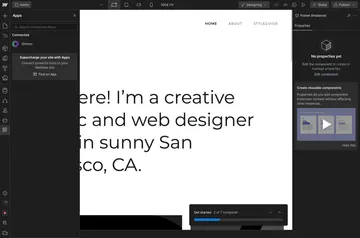
- Select a dotbrand form from a dropdown and preview it in a format like a Webflow form.
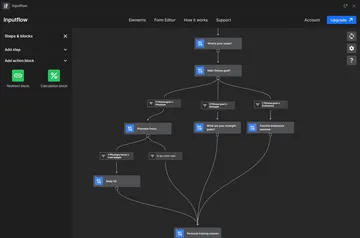
- Use images, design choices, and color selections to collect preferences from potential clients.
- After a prospect completes a survey, dotbrand provides design and business suggestions within seconds.
Getting started in Webflow
Install dotbrand on a Webflow site or Workspace, then connect a dotbrand account. Open the app from the Apps panel in Webflow Designer to start building.
What it costs
dotbrand is listed as free. The app is made by Willy's Workspace and connects Webflow sites to its automated survey service for designers.
Questions about dotbrand
Can surveys collect preferences about visual design?
Yes. Surveys can use images, design choices, and color selections to gather client preferences.
How do designers choose a form in Webflow?
They select a dotbrand form from a dropdown in Webflow Designer and can preview it like a Webflow form.
When are design and business suggestions provided?
dotbrand provides suggestions within seconds after a prospect completes a survey.
Where can dotbrand be installed?
It can be installed on a Webflow site or Workspace.
Where do designers open the app to begin building?
Open dotbrand from the Apps panel in Webflow Designer.
Is dotbrand yours? Add the badge
Show visitors that dotbrand is featured on FlowFav. Pick a style; the badge is a small image that links to this page and loads no script.
<a href="https://www.flowfav.com/app/optimize-design-process-with-dotbrand-webflow-app"><img src="https://www.flowfav.com/badge/featured-card-light.svg" alt="Featured on FlowFav" width="146" height="54"></a>