Route Form Submissions with Gapflow.io Webflow App
Route Webflow form inquiries, filter likely spam and send tailored replies with Gapflow.io.
Teams handling inquiries through Webflow forms can use Gapflow.io to direct messages to the right recipients and set up replies for each form.
Made by BRØRD, it syncs forms and fields automatically after one-click setup, so settings can be managed form by form.
The main tools
- Forward form submissions to multiple email recipients, helping teams route different inquiry types separately.
- Use AI filtering to identify likely spam and redirect it.
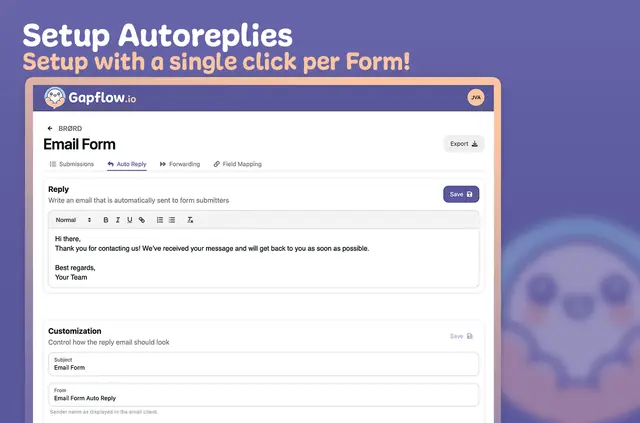
- Set custom autoresponders for individual forms.
- Group submissions by form, export them as CSV and assign custom email subjects.
What it asks for
Gapflow.io has a free option and paid plans. When installed, it requests permission to read pages, forms, sites and your Webflow user profile.
Gapflow.io in practice
In a Webflow project, Gapflow.io connects to forms and their fields, then syncs them so each form can have its own settings. A team could send separate inquiry types to different recipients and configure a distinct autoresponder for each form.
One account can manage multiple websites. Submissions can also be sorted by form and exported as CSV for further use.
Gapflow.io FAQ
Can I manage forms from more than one website in one account?
Yes. Gapflow.io supports managing multiple websites in one account.
Can submissions go to several email recipients?
Yes. Form submissions can be forwarded to multiple email recipients.
Can I redirect submissions flagged as likely spam?
Yes. AI filtering identifies likely spam, which can then be redirected.
Can I set a different automatic reply for each form?
Yes. Custom autoresponders can be configured for individual forms.
Can I export submissions or sort them by form?
Yes. Submissions can be categorized by form and exported as CSV.