Boost Webflow Ecommerce Efficiency with Astroic Webflow App
Streamline order invoices and bulk product management tasks for Webflow Ecommerce projects.
No longer on Webflow. This app is no longer in Webflow's app marketplace, so there's no install link. See similar apps or all Ecommerce apps.
About app
Astroic is a valuable dashboard app designed to assist Webflow Ecommerce site owners and developers in streamlining critical tasks such as order invoice management and bulk product editing. Let's delve into the purpose, features, benefits, and potential drawbacks of this app in detail:
Purpose:
Astroic aims to enhance the efficiency and convenience of managing Webflow Ecommerce sites by offering a centralized platform with essential tools to simplify tasks like printing order invoices, customizing them, and efficiently handling bulk product exports, imports, edits, and creations.
Main Features:
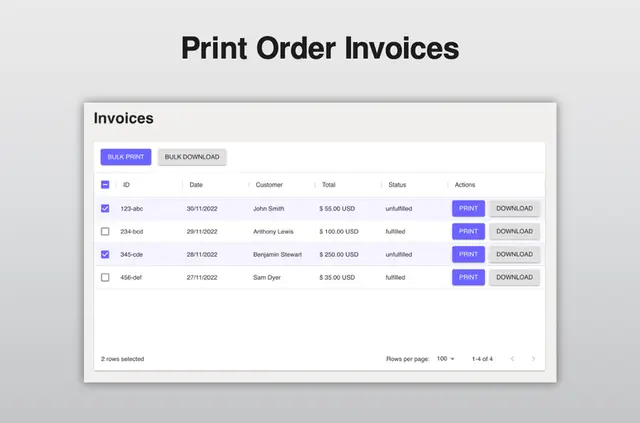
Order Invoice Printing:
- Print or download order invoices easily.
- Conduct bulk printing and downloading of invoices.
- Customize invoices with your logo and add personalized return instructions.
Bulk Edit & Bulk Create Products with Custom Fields:
- Includes all custom fields during bulk exports and imports.
- Export and import products in spreadsheet format.
- Bulk process hundreds of products simultaneously.
- Edit existing products in bulk and create new products in batches.
- Detailed error handling for failed imports with informative reports for troubleshooting.
Unique Functionalities:
- Efficiently manage order invoices with options for customization.
- Handle bulk product operations seamlessly, saving time and effort.
- Detailed error reports aid in rectifying import mistakes effectively.
- Bulk actions cater to high-volume product management requirements.
Benefits:
- Efficiency: Streamlines time-consuming tasks like invoice printing and product management.
- Performance: Reduces manual effort and errors in handling bulk product operations.
- User Experience: Enhances user satisfaction by simplifying complex tasks within the Webflow environment.
Drawbacks/Improvement Areas:
- Need for continual updates to match evolving Webflow features.
- Potential learning curve for less experienced Webflow users.
Real-World Scenarios:
- A Webflow Ecommerce store with a large product catalog uses Astroic to effortlessly manage bulk product imports, applying custom fields, and modifying existing items efficiently.
- A designer customizes order invoices with the client's branding elements using Astroic to maintain brand consistency.
Recommendation:
Webflow designers and developers dealing with Ecommerce projects, especially those handling substantial product inventories and frequent order processing, stand to benefit most from Astroic. The app's capabilities in simplifying order invoice management and bulk product operations make it ideal for users seeking efficiency and productivity in their Webflow Ecommerce projects.
In summary, Astroic offers a user-friendly dashboard with essential tools tailored for Webflow Ecommerce operations, providing notable advantages in efficiency, performance, and user experience enhancement for Webflow designers and developers.