Simplify Online Course Creation with Owwlish Webflow App
Owwlish adds online courses to Webflow pages, so learners can take courses within the site.
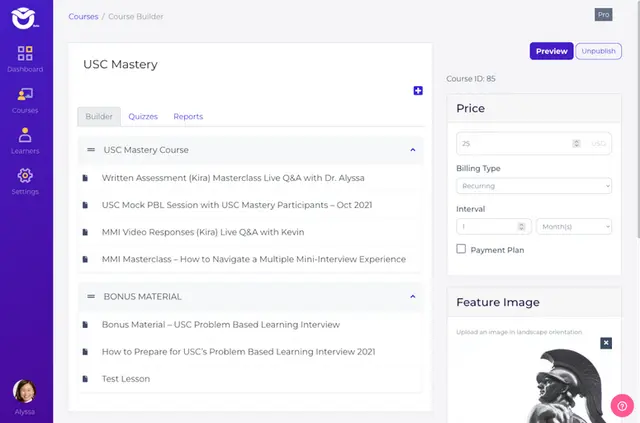
For Webflow site owners offering lessons to learners, Owwlish provides a course builder and a way to publish courses on the site. A course can be arranged into sections and lessons.
Owwlish is listed as paid. Courses are made in the builder, then published by adding a few lines of code to the Webflow site.
From install to first use
Start by creating a course in Owwlish’s builder and arranging it into sections and lessons. To publish it, paste a few lines of code into the Webflow site.
What Owwlish does
Owwlish adds courses to a Webflow project for learners to access on the site, rather than sending them to a separate subdomain. A course can include lessons, quizzes and video, with tracking to monitor learner activity and progress.
Features worth knowing
Course creators can use these capabilities to deliver lessons and follow learner activity.
- Organise course content into sections and lessons with the course builder.
- Add hosted HD video intended to prevent downloading and sharing outside the course.
- Use quizzes to assess learners’ understanding.
- Monitor learner activity and progress with learner tracking.
Owwlish FAQ
Can agencies use Owwlish on client sites?
Owwlish suits Webflow site owners who want to offer courses to learners, including owners of client sites.
How much does Owwlish cost?
Owwlish is listed as paid.
How are courses structured in Owwlish?
Courses are built from sections and lessons in Owwlish’s course builder.
Can a course include quizzes?
Yes. Owwlish supports quizzes to assess learners’ understanding.