Revolutionize Image Sourcing with Lummi AI Stock Images Webflow App: Diverse Categories & Advanced Filters
Find, filter and add AI-generated images to Webflow pages with Lummi.
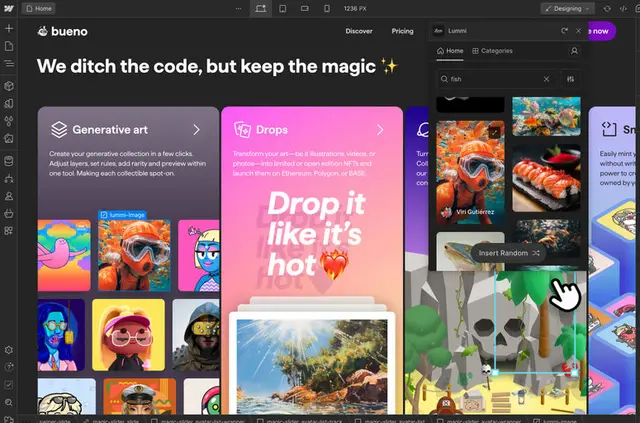
Webflow designers and teams use Lummi to source AI-generated imagery for site projects. Its library contains thousands of images made by artists around the world.
Browse or search more than 20 categories, including nature and backgrounds, to find imagery for a page.
Pricing
Lummi is listed as free to use. It is made by Blush (Udemy), and provides Webflow users with access to its image library.
What's included
- Filter images by color, orientation, luminance or number of people.
- Sort image results by newest or relevancy.
- Apply image filters before inserting images into a Webflow site.
- Browse thousands of AI-generated images across more than 20 categories.
What you can do with it
Use Lummi in a Webflow project to find and insert images for site pages. For example, search for nature or background imagery, narrow results by color or orientation, then apply filters before inserting an image.
Common questions
Does Lummi suit client projects?
Lummi is suited to Webflow users looking for AI-generated images for their projects, including client sites.
Who creates the images in Lummi?
Artists from around the world create the AI-generated images in Lummi's library.
Can I search for images in the library?
Yes. You can browse and search Lummi's image library for use in a Webflow site.
What kinds of image categories are available?
The library includes more than 20 categories, such as nature and backgrounds.
How can I narrow image results?
Filter by color, orientation, luminance or number of people, and sort results by newest or relevancy.