Cloneables · Categories

Product Webflow Cloneables

Explore a variety of Ecommerce Product Webflow Cloneables to enhance your website's design. Easily incorporate these high-quality cloneables into your Webflow project for a professional and polished look.

4 cloneables

360° Product Viewer
360° Product Viewer Enhance your website with a 360° Product Viewer Webflow cloneable, designed for interactive product showcasing. Elevate engagement with dynamic visual elements and seamless transitions. Integrate jQuery for smooth interactions and drag-and-drop capabilities. Ideal for Webflow users seeking to boost product presentation and conversions.

Clone
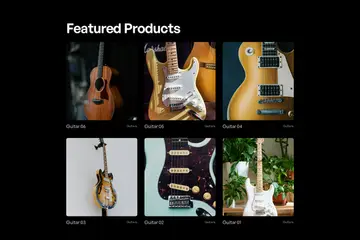
Flowboard Webflow cloneable
Flowboard Webflow cloneable Discover the innovative Flowboard Webflow cloneable by Diego Toda de Oliveira. Enhance your Webflow experience with a compact mechanical keyboard featuring custom keycaps for Webflow shortcuts and a mechanical dial for design adjustments. Elevate your projects with advanced JavaScript libraries and responsive CSS, optimizing productivity and design capabilities.
Clone
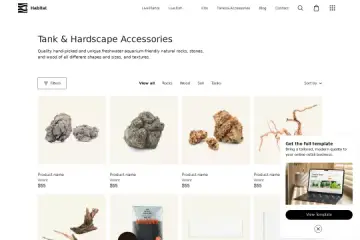
Aquatic Ecommerce Template
Aquatic Ecommerce Template Discover a modern Aquatic e-commerce Webflow cloneable template by Kdor. Streamline the shopping experience with clear organization, product showcases, and customization options. Enhance customer engagement and boost sales with this sleek and minimalistic template.
Clone
CSS CMS Filtering
CSS CMS Filtering The custom CSS ensures a structured layout for optimal display and filtering through CSS and integration with Cms-Nest.js for advanced content management. Optimize your site interactivity and responsiveness with this cloneable's features.
Clone

Questions about Product cloneables

How can you create a product page in Webflow?

To create a product page in Webflow, use Webflow’s CMS and Ecommerce features. Start by setting up a Products Collection and defining fields like name, price, description, and images. Then, create a Product Template Page that dynamically pulls product data using Collection fields. Use elements like Product Image, Add to Cart Button, and Price to design the layout. Customize the styling with Webflow’s Designer, ensuring a responsive design. Enhance functionality with interactions or custom code if needed. For a quick start, explore Webflow cloneables with pre-built Ecommerce templates to streamline your workflow.

What are some effective ways to design and customize product pages in Webflow?

Designing and customizing product pages in Webflow can be done efficiently using the CMS and ecommerce features. Utilize dynamic product fields like images, descriptions, and prices to create reusable templates. Incorporate custom interactions and animations for an engaging experience. Enhance page design with strategically placed product reviews, related items, and call-to-action buttons. Use flexbox or grid for responsive layouts. Leverage Webflow’s custom CSS and JavaScript options for advanced styling and functionality. Ensure SEO optimization with meta tags, alt text, and clean URL structures. Experiment with cloneable templates to speed up the design process while maintaining customization.

What are the most popular Webflow cloneables for showcasing and selling products?

Popular Webflow Cloneables for Showcasing and Selling Products

One of the top Webflow cloneables for showcasing and selling products is the Aquatic E-commerce Webflow Template Cloneable for Aquarium Retailers ( View Cloneable). This template is specifically designed for e-commerce businesses, particularly those in the aquarium retail industry. It provides a structured and visually appealing layout perfect for displaying products and driving sales.