Back Up and Copy Collections with Pixl Apps Webflow App
Pixl Apps helps Webflow designers and agencies manage collections across projects and sites.
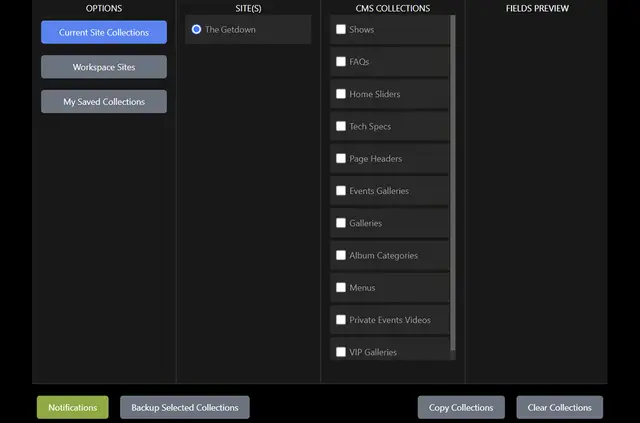
Manage Webflow CMS collections across websites in a workspace with Pixl Apps. It runs inside Webflow’s interface, so you can work with collections there.
For designers and agencies handling multiple projects, the app can also prepare placeholder content for a new site launch. Pixl Events makes Pixl Apps.
What's included
- Copy collections between sites that belong to the same workspace.
- Choose whether a collection’s data schema goes along with a transfer.
- Back up Webflow collections across your sites.
- Create placeholder content when preparing a new site launch.
How setup works
Install Pixl Apps to use it from within Webflow’s interface. Once installed, use it to manage collections across websites in your workspace, including copying or backing them up.
What it asks for
During installation, Pixl Apps requests permission to edit CMS content. It also asks to read your sites and your user profile, allowing the app to work with Webflow collections and site information.
Common questions
Can I copy collections between sites in different workspaces?
Pixl Apps copies collections between sites within the same workspace.
Does a collection transfer have to include its schema?
No. You can choose whether to transfer the collection data schema.
Can I make backups of Webflow collections with this app?
Yes. Pixl Apps supports backing up Webflow collections.
Can it add placeholder content for a site launch?
Yes. Pixl Apps can create placeholder content for new site launches.
Can I use Pixl Apps from inside Webflow?
Yes. The app works from within Webflow’s interface.