Display State Agent Counts with AgentTally Webflow App
Webflow site teams use AgentTally to add state-level real estate agent counts to their pages.
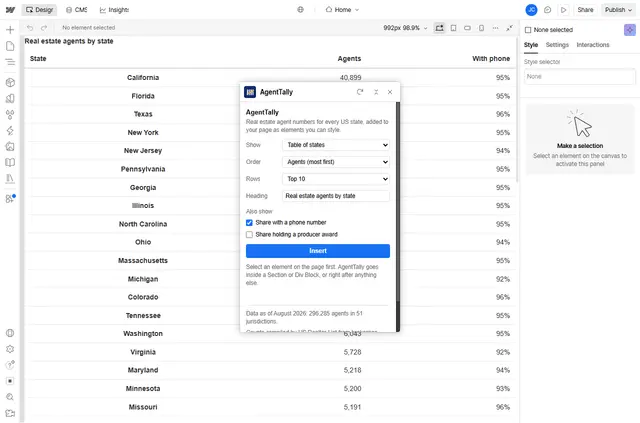
A Webflow page can show agent totals across the 50 states and Washington, DC, as a state table or a sentence about one state. AgentTally is made for site teams presenting real estate market information.
The counts combine brokerage rosters and state license registers. They are aggregate figures, not lookups for individual license holders.
What AgentTally does
Add a table sorted by agent count or state name, displaying every state or the top 10 or 20. Alternatively, insert a sentence showing the count for a selected state.
The inserted table or sentence uses Webflow elements with AgentTally classes. Teams can edit, move, and restyle those elements in Webflow Designer. AgentTally makes no network requests on Webflow and adds no scripts to the page.
From install to first use
In Webflow Designer, open the Apps panel and launch AgentTally. Choose where the content should go and set the display options, then click Insert.
Inserted content stays on the page if the app is removed, but its figures do not refresh automatically. AgentTally is free.
Quick answers about AgentTally
Who makes AgentTally?
AgentTally is made by Cogswell Apps.
Where do I use AgentTally once it's installed?
Launch it from the Apps panel in Webflow Designer.
Can non-developers use AgentTally?
Yes. The workflow is to choose a placement and display options in Webflow Designer, then click Insert.
Do the inserted figures update automatically?
No. The inserted figures remain as they were when added, even if the app is removed.
Does AgentTally add scripts or make network requests on Webflow?
No. It adds no scripts to the page and makes no network requests on Webflow.