Manage CMS Items in Bulk with Bulk CMS Editor Webflow App
For Webflow site builders with many collection records, Bulk CMS Editor lets you manage them in batches.
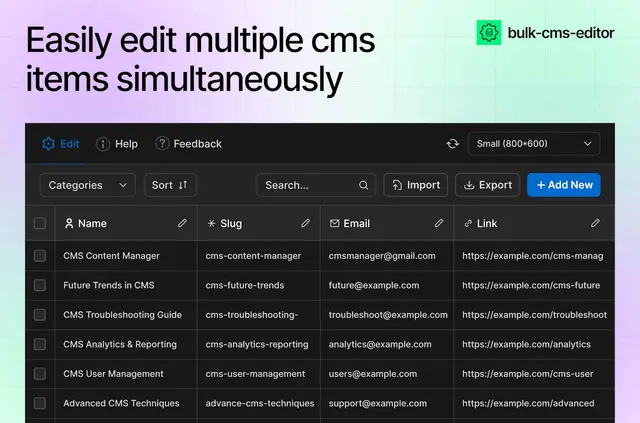
Update a set of Webflow collection items together instead of opening records one by one. Bulk CMS Editor gives you an interface for batch changes to fields and categories.
Made by FlowAppz, the paid app also lets you create or remove several CMS items in one operation. You need a Webflow CMS plan to use it.
What it handles
Use search, filters, and sorting to locate records, then change fields across selected items. You can also adjust references between posts, authors, and categories, or assign categories across multiple records.
For backup, reporting, or work in another tool, export collection data as CSV. You can also upload CMS items from a CSV file.
Access and pricing
The app is listed as paid and requires a Webflow CMS plan. Its requested permissions allow changes to CMS content and assets, plus reading site data and your profile.
How setup works
Install Bulk CMS Editor to start managing content in bulk. Then use its collection interface to work with CMS items without opening each one individually.
Bulk CMS Editor FAQ
Can I change the same field on several collection items at once?
Yes. Apply a field change to multiple CMS items in one operation.
Can I move CMS data between Webflow and a CSV file?
Yes. Upload items from a CSV file, or export collection data for backup, reporting, or editing elsewhere.
Can I update links between CMS items?
Yes. You can change references among selected records, such as connections between posts, authors, and categories.
Can I manage categories across multiple records?
Yes. Assign categories to several CMS records or change their existing categories.
Can I find a particular collection record before editing?
Yes. Search, filtering, and sorting help you locate specific records.