Generate Fluid CSS Clamp Values with Fluid Builder Webflow App
Fluid Builder is for Webflow builders who need to create CSS clamp values for project variables.
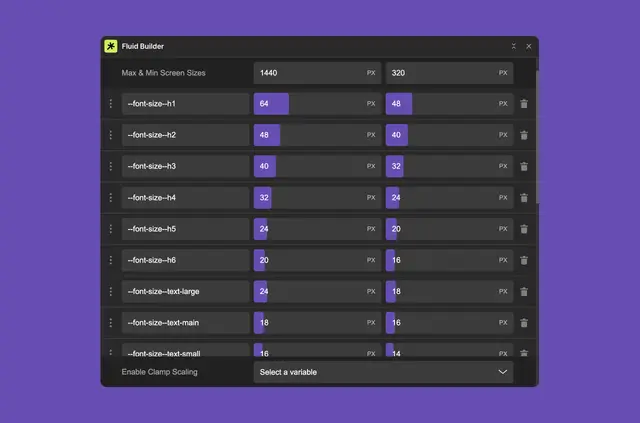
For sizing that can change fluidly, Fluid Builder generates CSS clamp values for use with Webflow Variables. You can make a new value or adjust one you already have.
Each clamp comes with an accessibility check. The app was made by Timothy Ricks.
Feature notes
- Generate CSS clamp values for Webflow Variables.
- Create a clamp value or edit an existing one.
- Check each clamp for accessibility.
- Add clamp values to your project as custom code.
- Apply values to size variables in the variable panel.
Fluid Builder in practice
In your Webflow project, create or revise a clamp value in Fluid Builder and add it as custom code. Then apply that value to a size variable in the variable panel.
Getting started in Webflow
Start by creating a clamp value or editing one you already use. Add the value to your project as custom code, then apply it to a size variable through the variable panel.
Fluid Builder FAQ
Can I edit a clamp value I already use?
Yes. Fluid Builder lets you edit existing clamp values or create new ones.
Does the app include accessibility checks?
Yes. It provides an accessibility check for each clamp value.
How does a clamp value get added to a project?
Fluid Builder adds clamp values to your project as custom code.
What CSS does Fluid Builder generate?
It generates CSS clamp values for Webflow Variables.