Convert Blog Posts to Audio with Trinity Audio Webflow App
Turn Webflow CMS blog posts into audio and add a branded player to published post pages.
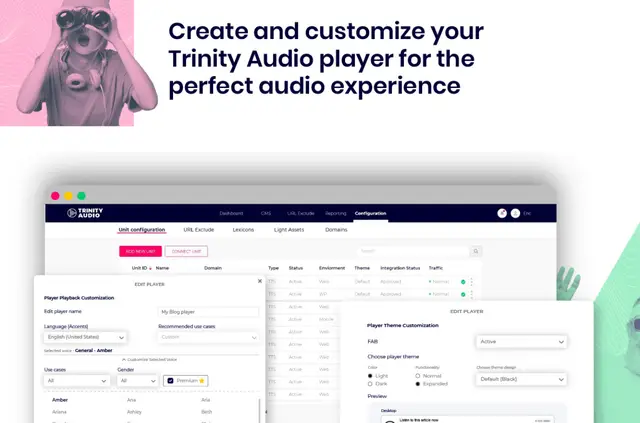
Inside Webflow Designer, site owners can set the voice and language for audio generated from posts in a Blog Posts collection. After publishing, visitors can play the audio on blog post pages.
Trinity Audio also provides engagement insights through its own dashboard. The embedded player can be adjusted to match a site’s branding and layout.
Worth checking first
A Webflow CMS plan is required, and the app is designed for sites with a Blog Posts CMS collection. Its Webflow permissions include editing custom code and reading CMS, pages, sites, site settings, workspace information, and the user profile.
The Account Key connects a Webflow site to Trinity Audio, so keep it private. The app is listed with a free option and paid plans.
How setup works
Install Trinity Audio from Webflow Apps & Integrations, authorize the site, then open the app in Designer. Register in the app panel and set the preferred audio voice and language.
Publish the site to show the player on blog post pages. Use the player customization options to fit the site’s branding and layout.
Who gets the most out of it
This app suits Webflow sites that publish posts through a Blog Posts CMS collection and want those articles available as audio. It is relevant to teams managing blog content in Webflow Designer who also want a player on their published post pages.
Site owners who want engagement information can use the Trinity Audio dashboard, while Designer controls let them choose the audio voice and language.
Questions about Trinity Audio
Do I need a paid Webflow plan for Trinity Audio?
Yes. Trinity Audio requires a Webflow CMS plan.
Where do I choose the audio voice and language?
Choose both from Webflow Designer.
What do I need to do for the player to appear on blog posts?
Register in the app panel and publish your site. The player then appears on blog post pages.
What does the Account Key do?
It connects your Webflow site with Trinity Audio. Keep the key private.
Where can I see engagement insights?
Trinity Audio provides engagement insights in its dashboard.