Add Visitor Accessibility Controls with AccessBit Webflow App
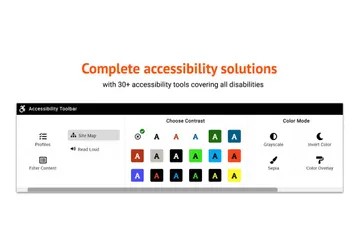
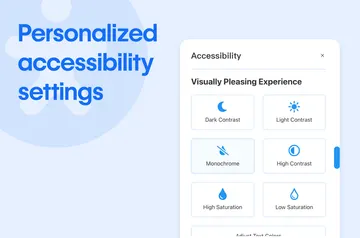
In Webflow, AccessBit adds an on-page widget that lets visitors adjust how they view and navigate your site.

Without AccessBit, you may need to build visitor controls yourself or rely on separate tools. Install and configure it directly in Webflow, and visitors can use an on-page widget to change how they view and interact with your site.
You can choose the widget’s color, icon, and position, then set different display rules for desktop and mobile. It provides extra options for visitors, while accessible design and testing remain part of your work.
Things to keep in mind
AccessBit does not guarantee automated WCAG or ADA compliance. Its controls do not replace accessible design practices or testing, so use them alongside that work.
Access and pricing
AccessBit is listed with a free option and paid plans. Its Webflow permissions allow it to edit custom code and view your user profile.
Feature notes
- Visitors can adjust contrast, colors, and text size, and use a high-visibility cursor or keyboard navigation aids.
- Focused Reading Mode, a Reading Guide line, and a Reading Mask provide options for reading site content.
- Visitors can pause animations, mute audio, hide decorative images, limit flashing elements, and simplify layout density.
- You can customize the widget’s color, icon, and position, with separate display rules for desktop and mobile.
Common questions
How do you install AccessBit in Webflow?
Install and configure AccessBit within Webflow without writing code.
Does AccessBit suit client projects?
It is suited to Webflow site owners who want visitors to have controls for reading and navigating content. The widget does not take the place of accessible design or testing.
Who makes AccessBit?
Seattle New Media makes AccessBit.
Can I change the widget’s appearance?
Yes. You can choose its color, icon, and position, and set different display rules for desktop and mobile.
Can visitors control animations and audio?
Yes. Visitors can pause animations and mute audio through the widget.