Build Responsive Sliders & Carousels with Zeltac Slider Webflow App
Create responsive Webflow sliders from page content or CMS items, with layout and controls you can set in Designer.
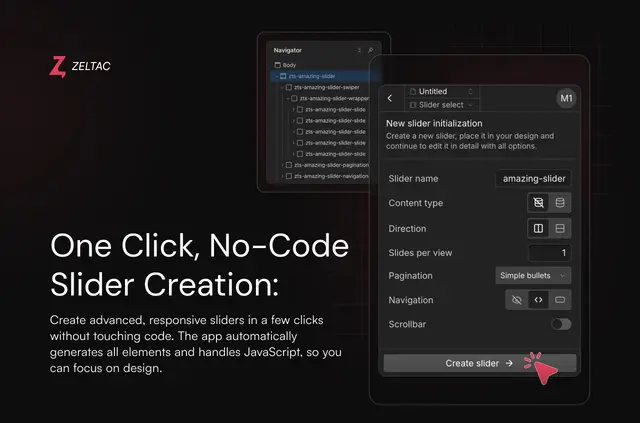
Whether you manage a marketing site or build Webflow projects for clients, you can use Zeltac Slider to make interactive carousels from static page content or CMS collection items. Vertical layouts are supported too.
The app creates and styles slider elements, then adds the code they need to work on published pages. After setup, you can edit sliders in the app and publish the site again to apply changes.
Pricing and permissions
The Free plan is $0 and includes unlimited sliders with features not marked Pro. Pro costs $7.70 per month or $64.80 per year, while Lifetime costs $77 once. Certain navigation options and transition effects are limited to paid tiers.
For Webflow access, Zeltac Slider can edit custom code and read sites and your user profile.
Worth checking first
To publish, your project needs a paid Webflow Site plan at Basic or higher, or a paid Workspace plan. The app’s real-time previews use sample content and may look different from the published slider.
Slide and fade are available as transitions. Cube, flip, coverflow, creative and cards effects are Pro or Lifetime options. Changes made in the app need a site republish before they appear on the live site.
When it's a good fit
Choose this app if you need sliders on a Webflow site and want to configure them without writing code. It works with either static page content or CMS collection content, making it useful for different kinds of page sections.
Set slides per view and spacing for mobile, tablet and desktop. You can also use autoplay, loop and keyboard controls, with optional mousewheel, zoom, parallax and custom Swiper parameters.
Questions about Zeltac Slider
What slider transitions does Zeltac Slider support?
Slide and fade are available. Cube, flip, coverflow, creative and cards effects are offered on Pro or Lifetime.
Can I use autoplay or keyboard controls?
Yes. Autoplay, loop and keyboard controls are available. Mousewheel, zoom, parallax and custom Swiper parameters are optional features.
Can I add arrows or pagination to a slider?
Navigation choices include bullets, numbered pagination, progress bars, fractions, arrows and custom buttons. Some options require Pro.
Can I build a vertical slider?
Yes. Zeltac Slider supports vertical layouts, as well as sliders made from static content or Webflow CMS collections.