Track Privacy-Friendly Site Analytics with Void Analytics Webflow App
Measure Webflow site visits, engagement and conversion paths with Void Analytics.
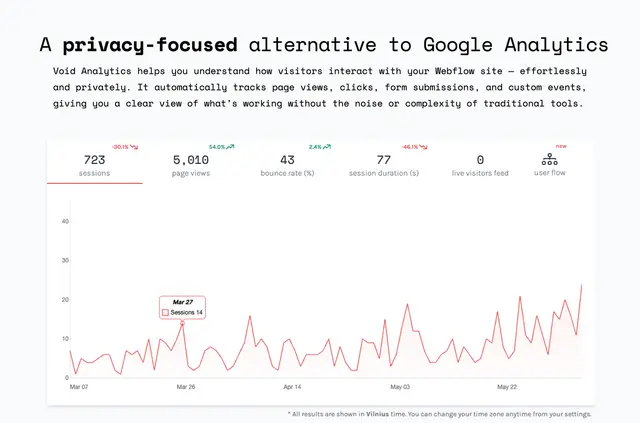
Site owners get reports on visits, engagement and the routes people take toward conversions. Void Analytics collects anonymized activity without cookies or persistent identifiers.
It connects to Webflow in one click and begins tracking site activity without code. Creators and teams can review traffic and engagement, then add JavaScript events when they need to track specific actions.
What's included
- Track page views, unique visitors, traffic sources, clicks and form submissions.
- Review popular pages, engagement, and visitor routes toward conversions.
- Record custom events with JavaScript through the window.voidLayer.push(...) method.
- Get analytics without cookies, persistent identifiers or sampled data.
What you can do with it
In a Webflow project, Void Analytics records activity across the site after a one-click connection, with no code required for automatic tracking. For actions beyond the standard tracked activity, developers can send custom events using JavaScript and the window.voidLayer.push(...) method.
Where it fits
The app is suited to creators and teams who want straightforward reports on website traffic and engagement. Its reports can help them see which pages draw visits and how people move toward conversions, while its anonymized, cookie-free approach avoids collecting personal data.
Questions about Void Analytics
Does Void Analytics use cookies or persistent identifiers?
No. It uses anonymized data and does not use cookies or persistent identifiers.
Do I need to add code to start tracking activity?
No. The app connects to Webflow in one click and automatically tracks site activity without code.
Can I track actions beyond page views and form submissions?
Yes. Custom events can be recorded with JavaScript using the window.voidLayer.push(...) method.
Does Void Analytics sample its data?
No. The app provides analytics without sampling data.
What Webflow access does the app request?
It can edit custom code and sites, and read site members and your user profile.