Create Narrated Videos from Site Content with ViGi Video Webflow App
In Webflow Designer, ViGi Video turns page and blog copy into narrated videos you can add to your site.
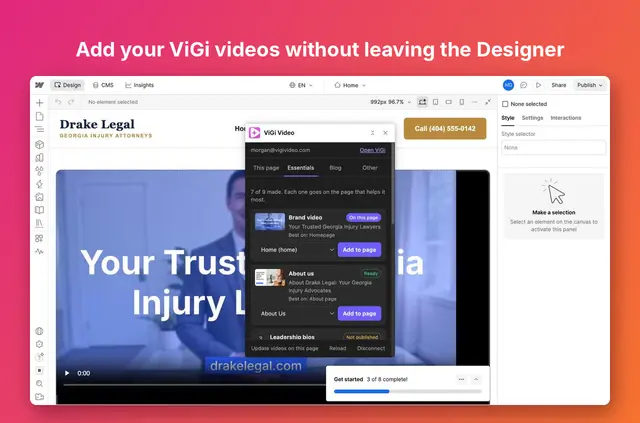
After setup, your business pages can have narrated videos made from the text already on them. For a blog, ViGi Video creates a video for each post and places it in the post template.
You connect a ViGi account, then work with the app in a panel inside Webflow Designer. It is built for small businesses that want videos based on their website content.
Before you install
ViGi Video has a free option: the first video is free, while additional videos require a ViGi plan starting at $97 per month. The app is also listed with paid plans.
- Can edit: CMS.
- Can read: sites and your user profile.
Where it fits
Use it on a business site when you want to turn existing page copy into narrated video. ViGi can suggest nine essential business videos for relevant pages and add them with one click.
For a blog, add one player to the post template. ViGi then creates a video from each post’s text, and videos on live posts update when their post changes.
From install to first use
Install the app and connect your ViGi account. Open its panel in Webflow Designer to add videos to your pages.
For a page, ViGi can create a narrated video from its text and add it before publication. For a blog, add the player to the post template so ViGi can generate videos from post content. Use the one-click update action to bring a page’s videos to their latest versions.
Questions about ViGi Video
Will videos keep playing if I disconnect my ViGi account?
Yes. Videos already on your site continue to play after you disconnect the account.
Does ViGi Video add scripts to published pages?
No. It uses HTML5 players with video markup and does not add scripts to published pages.
Can I refresh videos already on a page?
Yes. A one-click action updates the page’s videos to their latest versions.
Can I add a video before publishing a page?
Yes. ViGi can make a narrated video from the page text and add it before the page is published.
How does ViGi handle videos for blog posts?
Add one player to the post template, and ViGi creates a video from each post’s text. Videos on live posts update automatically when the post changes.