Host and Embed Videos with Video Cloud Webflow App
Add hosted video to Webflow pages in Designer, with embedded players or looping backgrounds on your published site.
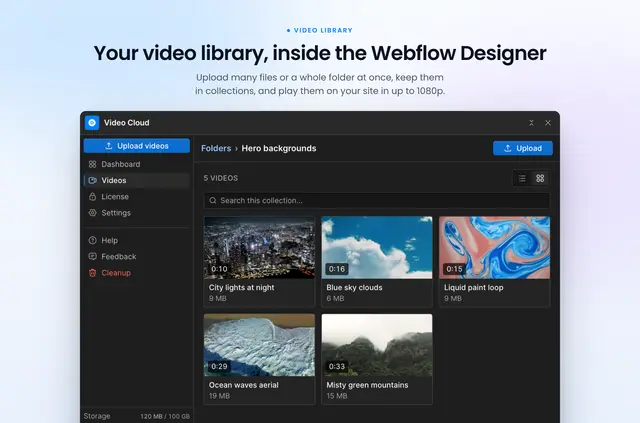
Video Cloud works in Webflow Designer, where you upload and organize files, and on published pages, where videos play through its own player or as backgrounds. It is made by FlowAppz.
Choose a page element for an embedded player or background video. The app also provides a dashboard for reviewing viewing activity and managing video details.
Who gets the most out of it
Video Cloud suits Webflow site owners who want to host video and place playback within their pages. Use an embedded player when visitors need controls, or a silent looping background to run behind page content.
Collections help organize uploaded files, while custom thumbnails and playback-page links give you options for presenting and sharing videos.
What it asks for
The app has no free plan, and all features require an active license. Monthly and yearly billing are available; it is listed with a free option and paid plans.
When installed, Video Cloud can edit pages and custom code. It can read sites and your user profile.
Limits to know
Embedded players need the app’s player script, added through its settings. That script loads in the site-wide footer on published pages, so the player does not appear in Webflow Designer. Background videos do not need the script.
Uploads support MP4, MOV, MKV, M4V, WebM and M4P files. You can add several files at once or upload a folder.
Questions about Video Cloud
How do you install Video Cloud in Webflow?
Install the app, then use its settings to add the player script to the site-wide footer for embedded players. The script runs on published pages, not in Designer; background videos do not require it.
What controls can viewers use in the video player?
The player can include playback, chapter, volume, speed, quality, subtitle, picture-in-picture and fullscreen controls.
Can you add subtitles or chapters to a video?
You can upload subtitles or generate and translate them with AI. AI can also propose chapters that you can edit.
What viewing data does the dashboard show?
The dashboard reports plays, watch time, viewing progress and top videos. It can also show viewer details such as country and device.
Can you limit where a video plays?
You can choose which domains are allowed to play your videos.