Organize Classes Using Emoticons with Sygnal Name Helper Webflow App
Inside the Webflow Designer, Sygnal Name Helper adds meaning and visibility to custom names and class names.
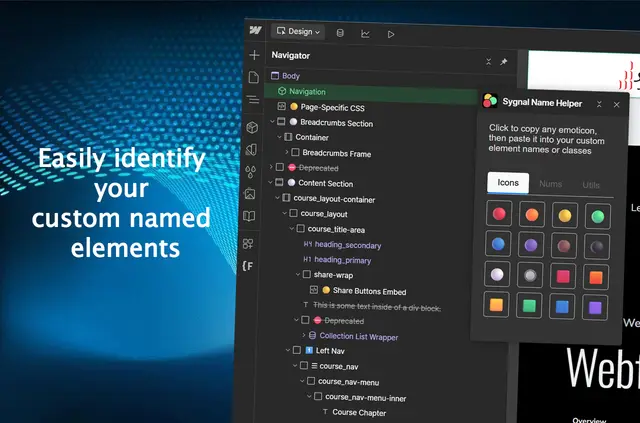
Sygnal Name Helper works in the Webflow Designer, where people building Webflow projects can choose an emoticon and add it to a name.
The icons are also available for rich text content, giving teams another place to use them within a project.
What Sygnal Name Helper does
Emoticons can make custom names and class names more meaningful and easier to see in the Designer. For example, a person can copy an icon and paste it into a project name or class name.
What's included
- Browse three groups of icons: bullets, numbers and utilities.
- Copy a chosen emoticon to the clipboard with one click.
- Paste copied icons into custom names and class names in the Designer.
- Use emoticons in rich text content as well.
Common questions
Where does Sygnal Name Helper work?
It works inside the Webflow Designer, where users select and copy emoticons for use in a project.
Can I use its icons in class names?
Yes. Emoticons can be pasted into class names as well as custom names.
What kinds of emoticons can I choose from?
The app groups its icons into bullets, numbers and utilities.
How do I copy an emoticon?
Choose an emoticon and use the one-click copy action to put it on the clipboard.
Can emoticons go into rich text?
Yes. They can be pasted into rich text content.