Consolidate CSS Classes with Class Merger Webflow App
Webflow site owners can consolidate a selected element’s classes into one named class while retaining responsive styles.
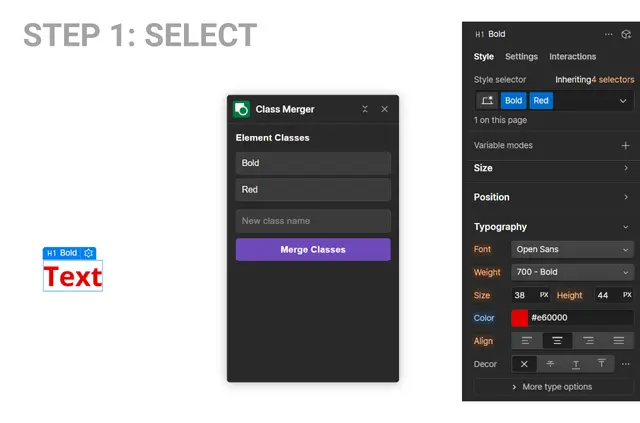
Webflow designers refactoring utility classes, inherited styles, or component styling can combine the classes on a selected element with Class Merger. Its extension panel shows which classes are applied.
Made by Paul Rodriguez, the free extension works with Webflow Designer API v2. Users choose a name for the merged class and apply it to the selected element.
Class Merger in practice
Class Merger combines multiple classes on one element into a new class. This can help when consolidating utility classes, inherited styles, or component styling as part of a Webflow project refactor.
The merged class retains styling at seven responsive widths, from Desktop XXL to Mobile Portrait. It also preserves pseudo-states such as hover, focus, and active; afterward, the panel shows the number of properties combined and checks for duplicate class names.
The main tools
- View the selected element’s applied classes in the extension panel.
- Set a custom name for the new class and apply it to the element.
- Retain styles across all seven breakpoints, from Desktop XXL through Mobile Portrait.
- Keep all 14 pseudo-states, including hover, focus, and active.
- See the combined property count and a duplicate class-name check after merging.
Getting started in Webflow
Class Merger works with Webflow Designer API v2. In Designer, select an element, enter a name for its merged class, then choose Merge Classes.
Common questions
Can Class Merger combine classes used for component styling?
Yes. It can combine classes on a selected element when refactoring component styling, utility classes, or inherited styles.
Can I name the class created by a merge?
Yes. Enter a custom name for the resulting class, which is then applied to the selected element.
What does Class Merger preserve besides regular styling?
It retains pseudo-states, including hover, focus, and active, as well as the other states supported in its set of 14.
Does the extension show which classes are on my selected element?
Yes. Its extension panel detects and displays the selected element’s applied classes.