Translate Ecommerce Products & CMS Items with StoreLingo Webflow App
For Webflow Ecommerce products and CMS items, StoreLingo creates translations you can review before publishing.
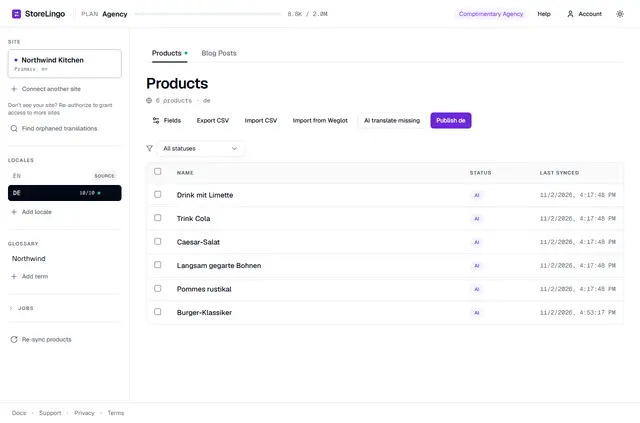
Visitors can find translated product and CMS content on a Webflow site after its team reviews and publishes it. StoreLingo uses DeepL for translation, with tools to edit fields and approve translations individually or in bulk.
Store teams can also use a glossary for selected terms and translation memory to reuse earlier translations and edits. StoreLingo is a paid app.
Caveats
Product translation requires Webflow Ecommerce; CMS translation requires at least one CMS collection. A Webflow CMS plan and Ecommerce plan are required. Translated copies count toward the site plan’s product and CMS item limits.
StoreLingo does not translate static page text, Ecommerce categories, slugs, navigation, or cart and checkout content. It does not switch visitor languages, add page code or hreflang tags, or publish an entire Webflow site.
- Translated products are separate items. On sites with Webflow Localization, CMS translations go to the corresponding locale.
- Products retain their source prices, SKUs and images, and are published with translated variant options and values.
- StoreLingo requests permission to edit CMS, Ecommerce and sites, and to read the user profile.
From install to first use
Connect a site using Webflow authorization, then choose a target language. Select which fields to translate, review the generated text and make edits as needed. Approve translations one at a time or in bulk, then publish from StoreLingo.
Teams can also export and import CSV files. A glossary is set per site and language to preserve chosen terms; translation memory draws on previous translations and edits. The app connects DeepL with Webflow CMS and Ecommerce through Webflow’s Data API.
Questions about StoreLingo
Do I need a paid Webflow plan for StoreLingo?
Yes. The requirements are a Webflow CMS plan and an Ecommerce plan. Product translations require Ecommerce, while CMS translations need at least one CMS collection.
Who is the developer behind StoreLingo?
StoreLingo is made by Qitalo.
Does StoreLingo work with Webflow Ecommerce?
Yes. It translates Ecommerce products, including variant options and values. Published product copies retain the source prices, SKUs and images.
How does StoreLingo publish CMS translations on localized sites?
On sites using Webflow Localization, CMS translations are written to the matching locale. Without that setup, translated products are published as separate items.
Can a team keep product terms consistent across translations?
A per-site, per-language glossary preserves selected terms. Translation memory can also reuse earlier translations and edits.