Translate Pages into Other Languages with Page Translator Webflow App
Translate selected Webflow pages into a secondary locale or make separate language pages you can edit in the Designer.
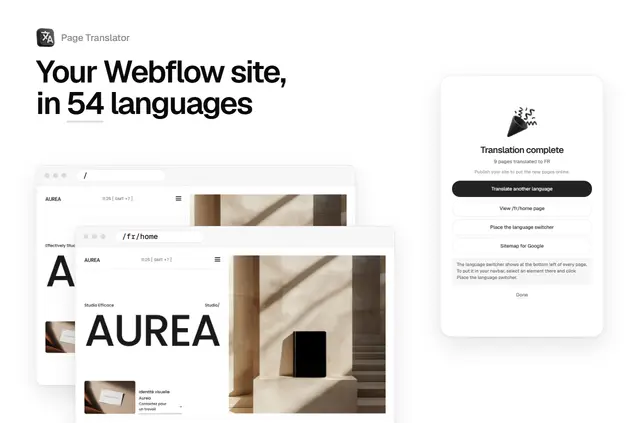
Use Page Translator from the Webflow Designer to work on selected site pages. It does not translate CMS collection pages, so its page-by-page options apply to regular Webflow pages.
You can send translations to Webflow Localization or create copies in language folders for editing. Choose based on whether your site has a secondary locale or you want separate pages.
Setting it up
Install Page Translator, open the Designer and select the pages for translation. For a locale-based run, turn on Webflow Localization and set up at least one secondary locale; then choose the locale where the app should place translated text and metadata.
For separate language pages, first make the source pages available on your webflow.io address. Keep the Designer tab open while the translation runs. The app creates copies in folders such as /fr/about, which you can edit as regular Webflow pages.
Things to keep in mind
The app translates titles, SEO and Open Graph descriptions, and shared components such as navigation and footers. In locale mode, it leaves images and slugs unchanged. CMS collection pages are outside its translation scope.
Separate pages keep Webflow interactions, but single-page animations need an extra manual step, and interactions added directly to translated pages do not run. For these pages, a sitemap with hreflang links is available, and the PRO switcher links corresponding pages. Instant translation uses Anthropic’s Claude model; you can enter a DeepL key instead. It covers up to 500,000 characters monthly, after which you can provide your own key.
What it asks for
Your first translation run is free for one language. PRO is a one-time €49 per site and includes all languages and the switcher; Page Translator is listed as paid. Separate pages need a paid Webflow site plan, Basic or higher. Locale translation needs Webflow Localization and at least one secondary locale.
On installation, the app can edit pages, custom code and components. It can read sites and your user profile.
Page Translator FAQ
Who makes Page Translator?
Page Translator is made by Ilies Allali.
Can I translate pages without Webflow Localization?
Yes. The app can create separate pages in language folders for you to edit in Webflow. This option requires a paid site plan, Basic or higher.
Which translation engine does the app use?
Instant translation uses Anthropic’s Claude model. You can also provide a DeepL key.
How many characters are included in instant translation?
Instant translation is included for up to 500,000 characters a month. Beyond that, you can supply your own DeepL key.
What does the PRO language switcher do?
It links matching pages across languages. The switcher is included with PRO.