Translate Multilingual Site Content with SimpleLocalize Webflow App
SimpleLocalize works with Webflow pages, CMS items, components and sites to manage multilingual content.
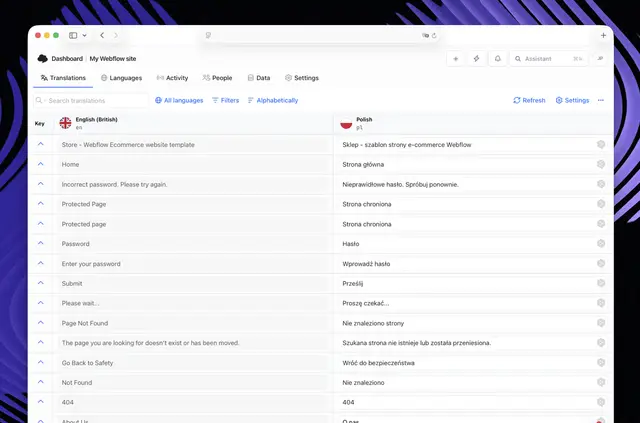
After setup, Webflow content can be translated and sent back to the site, so visitors can use its content in multiple languages. Teams manage translations in SimpleLocalize, either manually or automatically.
The workflow covers importing Webflow content, translating it and updating the project. AI translation is available through OpenAI, DeepL and OpenRouter with your own API key.
When it's a good fit
The app suits marketing sites, SaaS pages and product documentation that need content in multiple languages. Agencies can also use it to manage translation work across Webflow projects.
Administrators, translators and reviewers can collaborate through assigned roles and access permissions.
Getting started in Webflow
Getting started involves installing the plugin, connecting a SimpleLocalize account and importing Webflow content. Once imported, translations can be managed in SimpleLocalize and pushed back to Webflow.
The main tools
Translation and project management tools include:
- Translate pages, CMS items and components with AI using an OpenAI, DeepL or OpenRouter API key.
- Edit and manage translations in SimpleLocalize, with automatic or manual workflows.
- Run checks that flag missing, untranslated or inconsistent content across languages.
- Detect new or changed content and update only the parts that have changed.
SimpleLocalize FAQ
Which permissions does SimpleLocalize ask for?
It asks for permission to edit CMS content, pages, components and sites.
Is SimpleLocalize free?
SimpleLocalize is listed as free.
Can SimpleLocalize translate Webflow CMS items?
Yes. AI translation supports CMS items as well as pages and components.
Can a team review translations together?
Yes. Administrators, translators and reviewers can collaborate with assigned roles and access permissions.
Does it update content when Webflow copy changes?
It detects new or changed content and can update only the content that has changed.