Source Website Data to CMS Collections with SpecStream Webflow App
Gather facts from live websites and turn them into structured Webflow CMS items for site projects.
Webflow designers building directories, location pages, and comparison tables can gather sourced information with SpecStream. It reads live sources such as maps, registries, government systems, directories, and business websites.
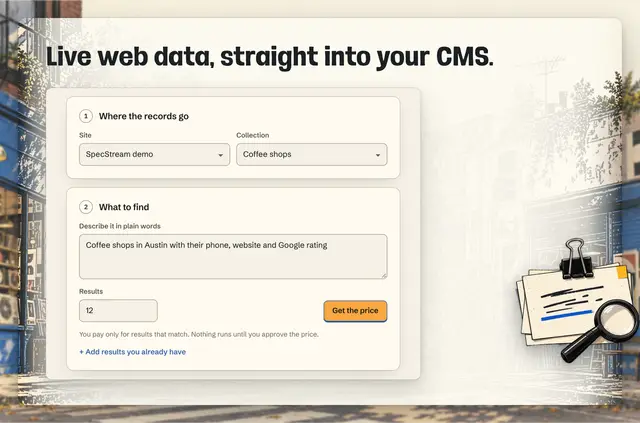
Choose an existing CMS collection or create one with fields shaped for the requested information. Before work begins, SpecStream shows how it interpreted the request and the maximum possible cost.
Limits to know
Matching results cost from 10¢ each; searches that return no results are free. Every item includes a link to its source page and the date its information was read. If the same results are added again, existing items are updated rather than duplicated.
SpecStream writes only to collections selected for the task. It cannot publish a Webflow site.
When it's a good fit
SpecStream suits Webflow designers creating directories, location pages, and comparison tables from sourced facts. These projects can use structured collection fields tailored to the requested data, with a source link and information date on each item.
Getting started in Webflow
Install the app, then select a CMS collection or create one with fields for the information being gathered. Write a plain-language request and review the interpretation and maximum cost shown before a run.
New accounts get $10 of work without a card. SpecStream connects to Webflow CMS collections to read collection data and write the selected results.
Questions about SpecStream
Which permissions does SpecStream ask for?
It can edit CMS and read sites and your user profile.
Is SpecStream free?
Installation is free, and SpecStream is listed with a free option and paid plans. Matching results start at 10¢ each, and searches with no results cost nothing.
Does SpecStream work with Webflow CMS collections?
Yes. It reads collection data and writes results to the collections selected for a task.
Can SpecStream publish a Webflow site?
No. It can write to selected CMS collections, but it cannot publish the site.
What happens if the same results are added again?
SpecStream updates existing items instead of creating duplicates.