Back Up Pages & CMS Content with ProBackup Webflow App
Back up Webflow pages and CMS collections automatically, then browse earlier copies when you need them.
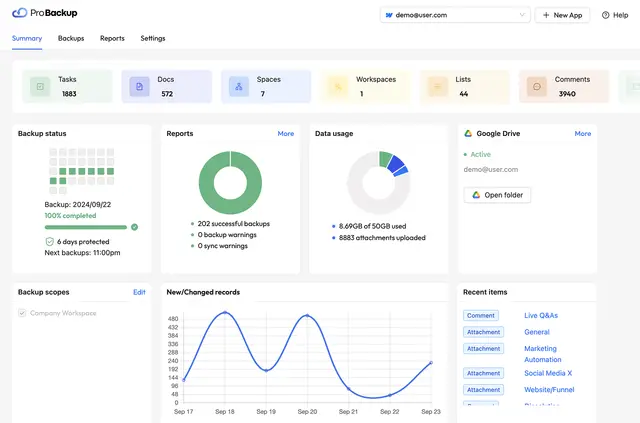
ProBackup works with connected Webflow data rather than inside the Designer, on your published site, or in the CMS interface. Connect your Webflow account to begin automated backups; setup takes about three minutes per app.
If you want copies of your site content to help recover from accidental edits or deletions, you can browse past backups and compare their data. ProBackup also monitors backup integrity and sends a weekly activity report.
What it asks for
ProBackup is listed with a free option and paid plans. When installed, it can edit CMS, pages, custom code, assets, site members, components, comments, and sites. It can read forms and your user profile.
ProBackup in practice
Daily backups cover connected Webflow pages and CMS collections. Historical versions let you look through earlier copies and compare backed-up data, which can help you identify changes before restoring content after an accidental edit or deletion.
Integrity checks watch for unusual changes and can alert you. You can also sync backups to Google Drive, while a weekly report summarizes backup activity.
ProBackup FAQ
Can I look at older copies of my Webflow content?
Yes. ProBackup keeps historical versions you can browse and compare.
Can ProBackup flag unusual changes to backups?
Yes. Its integrity checks monitor backups and can alert you to unusual changes.
How often does ProBackup back up connected Webflow data?
It backs up connected data every day.
Can I keep backup copies in Google Drive?
Yes. ProBackup can sync backups to Google Drive.
How long does setup take for an app?
Setup takes about three minutes per app after you connect a Webflow account.