Add Conversational AI to Answer Visitors with PromptMySite Webflow App
Add a site-trained conversational assistant to answer visitor questions and guide browsing, forms, and bookings.
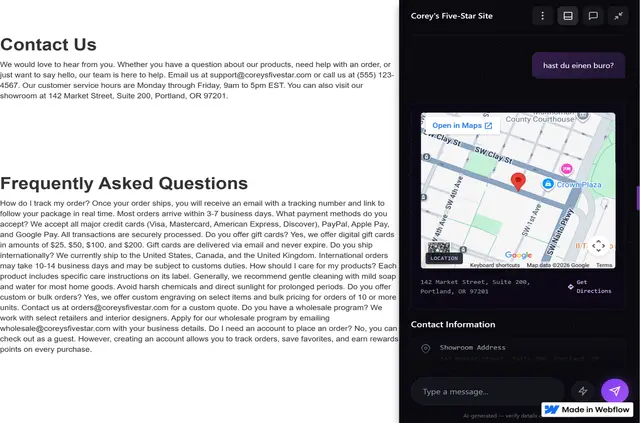
On the published Webflow site, PromptMySite answers visitor questions through a conversational interface. It learns from the site’s content, brand voice and visual style; installation starts in the Webflow Marketplace and adds custom code without manual coding.
The assistant can show information in formats such as product cards, comparison tables, galleries, guides and maps. Its dashboard receives form submissions and provides analytics on conversations, engagement and content gaps.
Pricing and permissions
A free option includes 50 messages per month. Paid tiers include Starter with 500 messages, Growth with 2,000, and Pro with 5,000 or more. Removing PromptMySite branding is available on paid plans.
During installation, it can edit custom code and sites, and read CMS content, pages, forms, ecommerce data and the user profile.
Worth checking first
Message allowances vary by plan, and branding removal requires a paid plan. Connecting the assistant to live inventory, pricing or availability depends on connecting it to existing site data sources.
Where it fits
It suits Webflow sites where visitors need help browsing products, comparing options, asking questions, submitting leads or making bookings. Teams can use conversational forms to ask follow-up questions, with submissions sent to the PromptMySite dashboard.
Questions about PromptMySite
Can the assistant reply in a visitor’s language?
It supports more than 90 languages and can detect the visitor’s language automatically.
What can I change about its appearance?
Options include 12 color palettes, four display modes, card and button styles, and custom logo uploads.
Can answers show more than text?
Yes. Replies can include interactive elements such as product cards, pricing comparisons, tables, galleries, guides and maps.
Where do conversational form submissions go?
They are sent to the PromptMySite dashboard after the assistant asks follow-up questions.
What can the analytics report on?
Analytics cover conversation patterns, visitor engagement, form submissions and gaps in site content. Reports can be exported.