Browse and Copy Design Components with Motionrow Webflow App
A Webflow Designer component catalog, Motionrow lets site builders preview options and place them on a project canvas.
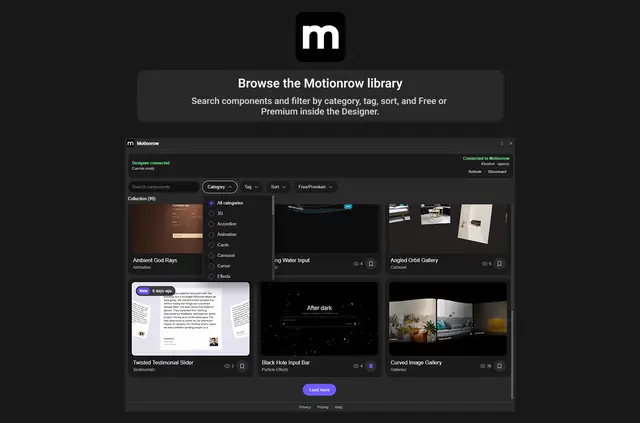
Motionrow brings a searchable component catalog into Webflow Designer. Site builders can narrow results with filters, watch hover-video previews, and visit live examples before choosing an item.
Made by Appsrow, the app is free to install. A Free account can browse, and signing in makes eight named components available to copy at no charge. Other catalog items have additional access options.
Who gets the most out of it
Motionrow fits designers and teams building Webflow sites who want to find and compare components while working in Designer. Search, filters, video clips, and live examples support projects where the right component needs to be assessed before it is added.
It can suit builds that use visual effects or scripts as well as page elements. Since certain items place an Embed at page level, teams may want to consider how that fits their project setup.
What Motionrow does
Install Motionrow in Designer and sign in with a Motionrow account. Choose the Webflow copy option, then paste the selected item onto the project canvas, where it becomes part of the project.
Some items rely on WebGL, Three.js, GSAP, ScrollTrigger, slider or FAQ scripts, and images can be served from Cloudinary. Motionrow handles purchases on its own website rather than within Webflow.
Quick answers about Motionrow
Is a Motionrow account needed to copy items?
Yes. A Motionrow account is needed for the copy process in Designer.
Can I see a component in action before using it?
Yes. Motionrow provides hover-triggered video clips and links to live component examples.
What does the free option include?
The app costs nothing to install. A Free account can browse, and eight named items are available to copy after signing in.
How are paid component options purchased?
Access beyond the free items is offered through Pro, Agency, or a single purchase. Transactions take place on Motionrow’s website, not in Webflow.
Can a component add an Embed to a page?
Yes. Certain components add a Webflow Embed at page level to support effects or scripts.