Convert HTML into Editable Elements with HTMLtoflow Webflow App
HTMLtoflow is for Webflow builders who want to turn raw HTML into elements for Webflow Designer.
HTMLtoflow is an app that converts raw HTML into Webflow elements while preserving the markup’s structure. You can use the result in Webflow Designer.
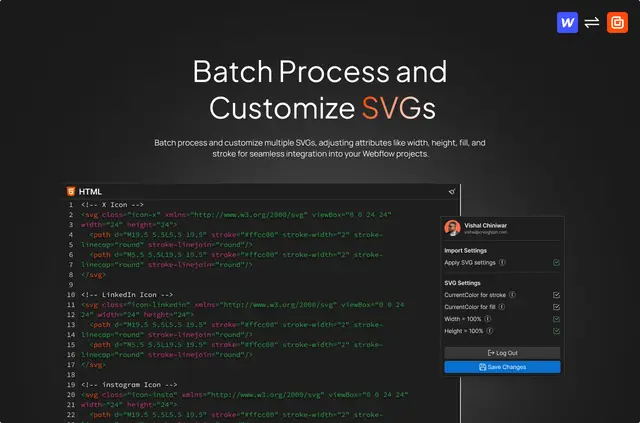
It also supports custom styling with CSS3 and offers controls for SVG dimensions and colors.
From install to first use
Install HTMLtoflow, then paste your markup into the HTML input area and convert it for use in Webflow Designer. To add styling, enter CSS in the app’s separate CSS input.
To work with SVGs, place them in the HTML field and turn on the SVG options before conversion. You can process several together and set their width, height, fill and stroke.
Caveats
The app accepts vanilla HTML and CSS3. If your styles are written in SASS, SCSS or LESS, convert them to CSS first. HTMLtoflow does not fully validate either HTML or CSS, so inspect your code and converted output.
For combo classes, Webflow’s restriction means the conversion adds just the first class. Some reserved attributes can also be stripped when you publish a site.
Before you install
Creoglyph makes HTMLtoflow. It is listed with both a free option and paid plans.
During installation, the requested Webflow permissions cover reading sites and your user profile.
HTMLtoflow FAQ
Can I add custom CSS with HTMLtoflow?
Yes. Put vanilla CSS3 in the app’s CSS input area to apply custom styling.
Which CSS formats does HTMLtoflow accept?
Use standard CSS3. Preprocessor files written in SASS, SCSS or LESS need to be changed into CSS before use.
Can HTMLtoflow convert multiple SVGs together?
Yes. Turn on the SVG controls and include your SVGs with the markup you submit. Their width, height, fill and stroke can be adjusted.
How does HTMLtoflow handle combo classes?
Only the first class in a combo is added, since Webflow does not support creating combo classes.
What can HTMLtoflow read when installed?
Its installation permission covers read access to your Webflow sites and profile.