Upload Figma Frames to Asset Libraries with exportflow Webflow App
Exportflow sends selected Figma frames to a Webflow site's asset library, where teams can prepare images for use on their site.
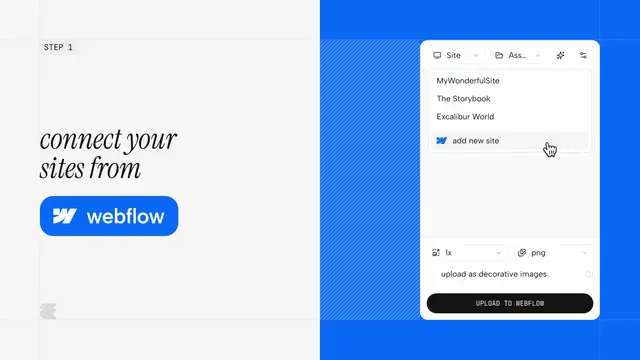
Exportflow is a Figma plugin for moving selected frames into a Webflow site's asset library. Designers, indie makers and agency teams can choose upload settings for each batch.
Things to keep in mind
A batch can include up to 10 frames. Supported file types are PNG, SVG, JPG, WebP and AVIF, with scale settings ranging from 0.25× to 4×.
Asset uploads are unlimited on every plan. AI generation has separate allowances: the free option includes 30 generations in a rolling 30-day period, while Starter costs $4.99 per month and includes 500 per billing cycle. Gemini-powered titles and alt text are optional; batches can instead be marked decorative when alt text is not needed.
From install to first use
Install Exportflow from the Figma Community, then connect a Webflow account using OAuth. For an upload, select up to 10 frames and choose the destination site, asset folder, format and scale.
The plugin uses Webflow OAuth and the Webflow Data API v2 asset pipeline to send the files. Its requested access allows it to edit assets and read site information and the user's profile.
Where it fits
Exportflow suits projects where designs are made in Figma and the resulting images need to be placed in a Webflow site's asset library. Batch settings make it possible to choose the destination and file output as frames are prepared for upload.
It is intended for individual makers as well as design and agency teams. Multiple Webflow accounts can be connected, with a different account selected for each upload batch.
Questions about exportflow
Which file formats and image scales can I choose?
Exportflow supports PNG, SVG, JPG, WebP and AVIF. Scale options run from 0.25× through 4×.
Can the plugin create alt text for uploaded images?
Optional Gemini-powered AI can generate asset titles and alt text before upload. A batch can also be marked decorative if alt text is unnecessary.
Can I upload to more than one Webflow account?
Yes. Multiple accounts can be connected, and an account can be chosen separately for each batch.
What Webflow access does Exportflow request?
It can edit assets and read sites and your user profile.
What do the free and Starter plans include?
The free option includes 30 AI generations per rolling 30-day window. Starter is $4.99 per month and includes 500 generations per billing cycle; uploads are unlimited on every plan.