Sync Warehouse Data to CMS Collections with Census Webflow App
Census syncs warehouse data with Webflow CMS, giving site owners a way to manage collection content.
Census does its work with Webflow CMS collections, bringing customer and business information from a cloud warehouse into website content. Marketers use this data to tailor pages without custom scripts.
Data teams can work with SQL, Git and dbt integrations, and sync triggers. Census also connects Webflow with databases and more than 20 additional data sources.
Setting it up
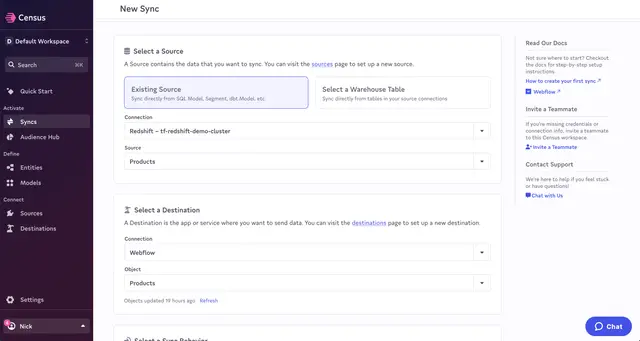
Install Census, connect Webflow as the destination, then connect a data source. Select the CMS collections to use and map source data to the collections’ custom fields to prepare a sync.
What's included
A visual interface provides controls for choosing collections and matching source data with their fields. Collection changes can be managed in a single workflow.
- Add, change, or remove CMS items in bulk through one workflow.
- Set recurring syncs to keep CMS collections current.
- Use SQL, Git and dbt integrations, plus sync triggers.
- Access controls and security features support enterprise use.
Questions about Census
Can Census tailor website content based on customer data?
Yes. Census brings customer data from a cloud warehouse into Webflow CMS, where marketers can use it to personalize website content.
Can Census remove items from a Webflow collection?
Yes. A Census workflow can delete CMS items, as well as add and update them.
Can CMS syncs run automatically?
Yes. Syncs can run on an automated schedule to keep collections current.
Which sources can Census connect to?
Census connects Webflow with data warehouses, databases, and more than 20 other data sources.
What Webflow permissions does Census request?
Census requests permission to edit CMS content and read sites.