Manage Classes and HTML Attributes with Attriflow Webflow App
Use Attriflow inside Webflow Designer to manage HTML attributes and classes while you work on a project.
Webflow developers, design agencies, and freelancers can use Attriflow to manage classes and HTML attributes in projects they can edit. The app runs within Webflow Designer and shows attribute changes as they happen.
You can get Attriflow from the Webflow Marketplace and use it in a Webflow project where you have editing access. It is listed as free, and its developer is Creoglyph.
Things to keep in mind
To apply batch operations, select several elements with Ctrl+Click. Bulk attribute changes may be restricted when those elements have different attribute structures.
Attriflow requests permission to read your sites and user profile when installed. Its class-renaming tool works on multiple classes, with combo classes outside the operation.
Feature notes
- Add, edit, or remove attributes across several selected elements in a batch.
- Apply templates that provide predefined attribute sets for elements.
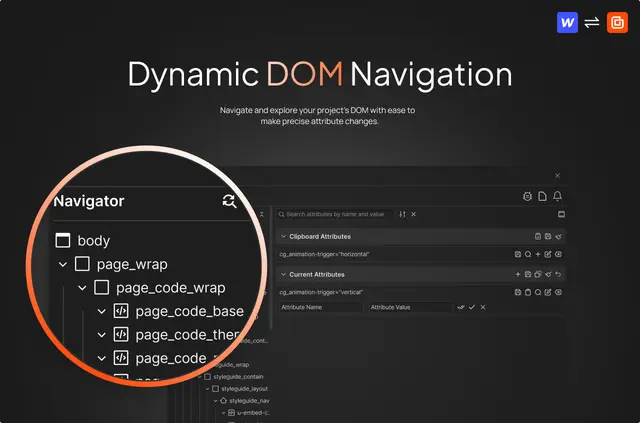
- Use DOM navigation to locate elements and change their attributes.
- Search classes and preview bulk replacements before applying them.
- Rename multiple classes in one operation; combo classes are not part of this operation.
Where it fits
Attriflow suits developers, agencies, and freelancers who maintain classes and attributes across Webflow projects. Batch editing helps when the same kind of attribute work applies to several selected elements, while DOM navigation provides a way to find elements that need changes.
Because it runs in Webflow Designer, you can work with Attriflow in projects where you have editing access and see attribute changes as you make them. It is intended for managing project classes and HTML attributes, rather than for a particular site type.
Quick answers about Attriflow
Can I use templates for attribute sets?
Yes. Attriflow provides templates that apply predefined sets of attributes to elements.
How can I find an element to edit?
Use Attriflow’s DOM navigation to locate an element and change its attributes.
Does Attriflow show attribute changes while I work?
Yes. It runs inside Webflow Designer and shows attribute changes as they are made.
What permissions does Attriflow request?
When installed, Attriflow requests permission to read your sites and your user profile.
Where can I get Attriflow, and how is it listed?
You can get it from the Webflow Marketplace. Attriflow is listed as free.