Configure Attribute-Based Layouts with Scaffold Webflow App
Scaffold helps Webflow teams and developers build attribute-based layouts and configure elements in Designer.
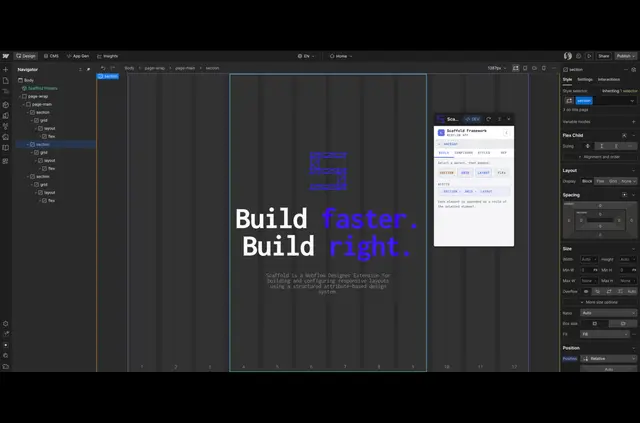
Inside Webflow Designer, Scaffold reads and writes HTML attributes on selected elements. It is for Webflow teams and developers who use attributes to manage layout, spacing, and typography.
Install it from the Webflow Marketplace, then launch it from Designer’s Apps panel. Scaffold works within Designer without external APIs or third-party services.
What's included
- Build adds .section, .grid, .layout, .flex, or .text elements beneath a selected parent, with an option for nested structures.
- Configure identifies an element’s class and shows controls for the attributes associated with it.
- Flex controls offer an X/Y toggle, a 3×3 alignment picker, and S/C/E shortcuts for desktop, tablet, and mobile.
- Ref displays a clipboard screenshot as a scrollable guide inside the extension.
- A light and dark mode toggle saves the chosen theme in browser local storage.
Worth checking first
Controls rely on Scaffold’s specific attribute system, so elements must have the expected classes and attributes. Clicked or toggled changes apply immediately; typed edits are debounced by 600 milliseconds.
What Scaffold does
Scaffold can add layout or text elements to a selected parent, then present attribute controls based on the element’s class. For example, a developer can create a .grid or .flex element in Build and adjust its attributes in Configure.
Common questions
Does Scaffold work on a published Webflow site?
Scaffold runs inside Webflow Designer and works with selected elements there.
How quickly do attribute edits apply?
Clicks and toggles take effect immediately. Typed edits are debounced by 600 milliseconds.
Can Build create a hierarchy rather than a single item?
Yes. Build has an option to create nested structures beneath the chosen parent.
Can a screenshot stay visible as a design reference?
Yes. Ref accepts a clipboard screenshot and presents it as a scrollable guide within the extension.
Does Scaffold use external APIs or third-party services?
No. It operates within Webflow Designer without external APIs or third-party services.