Add Appointment Booking to Pages with WhenTap Webflow App
Add appointment booking to your Webflow site so visitors can choose a service, staff member, and time.
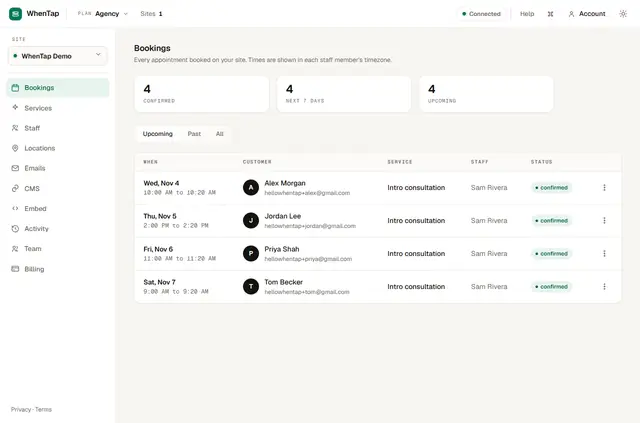
WhenTap puts booking on the published site, where visitors select a service, a staff member, and an available time without going to another site. You connect it by authorizing the app in Webflow, adding a Div with a custom attribute, placing it on the page, and publishing.
Manage services, staff, and locations in mapped Webflow CMS Collections or in WhenTap. Staff schedules can account for working hours, time buffers, minimum notice, days off, and busy times from Google Calendar or Outlook.
Caveats
WhenTap reads and writes only the primary locale of your site, and Webflow CMS item limits apply to booking records. Changes to published CMS content sync after Webflow reports them.
Free bookings are confirmed on the site; paid bookings are confirmed after Stripe checkout. Customers can change or cancel a booking through a private link, within the cutoff set for that service.
Access and pricing
The paid plans are Starter at 9 USD a month, Growth at 19 USD a month, Pro at 39 USD a month, and Agency at 99 USD a month.
When installed, WhenTap requests permission to edit CMS, custom code, and sites, and to read your user profile.
What WhenTap does
Confirmed appointments can be added to connected Google Calendar or Outlook calendars. When a booking is rescheduled or cancelled, its saved draft item in your chosen Webflow Collection is updated as well.
Customers receive confirmation emails and eligible reminders, including booking notes. Growth adds the option to use custom logos and colours in those emails. You can take payment through your business’s Stripe account; WhenTap processes paid bookings through it.
Quick answers about WhenTap
Who is the developer behind WhenTap?
WhenTap is made by Qitalo.
Can agencies use WhenTap on client sites?
Yes. Agency is one of WhenTap’s paid plans, and the app is suited to Webflow service businesses, including teams with separate staff schedules.
Can WhenTap work with my CMS items?
Yes. You can map Webflow CMS Collections for services, staff, and locations. Confirmed bookings can also be saved as draft items in a Collection you choose.
Can customers reschedule or cancel a booking?
Yes. Customers can use a private link, subject to the cutoff configured for that service.
Can staff availability account for existing calendar events?
Yes. WhenTap can sync busy times from Google Calendar or Outlook when setting staff availability.