Replace Styles Across Pages with Style Find & Replace Webflow App
Webflow users handling page-wide style edits can use Style Find & Replace to update matching styles across elements.
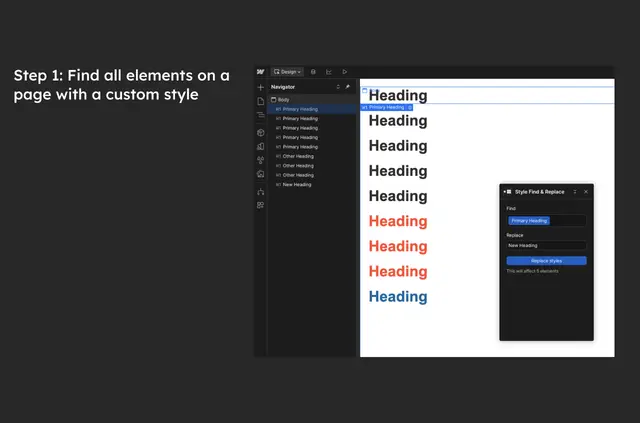
On a Webflow page, Style Find & Replace locates styles used by elements and applies replacements to those that match. Parker Thompson made the app.
Its focus is bulk style work at page level, including consolidating combo classes into a single class.
Who it suits
The app suits Webflow users updating styles across multiple elements on a page. It is relevant to projects where a style change needs to apply consistently to matching elements rather than being made one element at a time.
What Style Find & Replace does
Style Find & Replace locates styles across page elements and changes the styles that match a replacement. For example, it can replace combo classes with one class.
Quick answers about Style Find & Replace
Does Style Find & Replace work across a whole Webflow site?
It applies replacements to matching styles on a Webflow page.
What happens when a style replacement is applied?
Elements on the page with matching styles receive the replacement.
Can it consolidate combo classes?
Yes. It can replace combo classes with a single class.
Who made the app?
Parker Thompson made Style Find & Replace.
What kind of editing is the app intended for?
It suits bulk style changes to a Webflow page.