Target Visitors by Location with Smart Geo Targeting Tool Webflow App
In Webflow, Smart Geo Targeting Tool connects sites to a dashboard for location-based changes.
Without this tool, site builders may need manual work or extra tools to change content by visitor location. Smart Geo Targeting Tool detects locations and lets teams adjust page elements, display popups, block visitors, or send them to another destination.
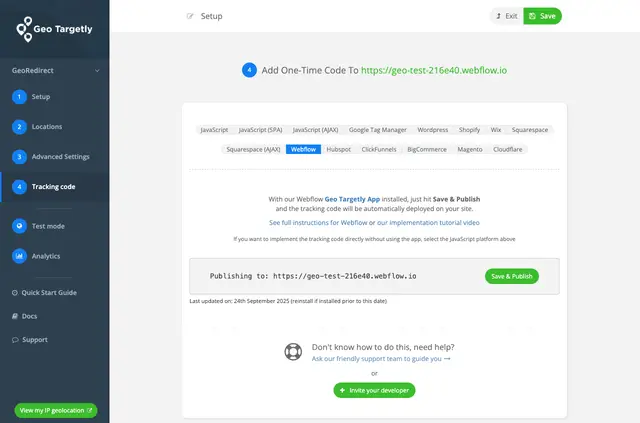
Webflow sites connect to the GT Dashboard, where teams set up targeting and publish code remotely. The dashboard shows connection status and keeps configurations separate across domains.
Before you install
The app is listed as free. When installed, it can edit custom code and sites, and read the Webflow user profile.
Who it suits
It suits Webflow site owners, agencies handling client sites, and marketing teams that need location-based changes. Separate configurations across domains support teams working with multiple websites.
Worth checking first
A site must be authorized through the Marketplace or Settings, then selected when a targeting setup is created. Changes are published from the GT Dashboard with Save & Publish.
Webflow API limits require a one-minute pause between publishing actions.
Common questions
Who is the developer behind Smart Geo Targeting Tool?
The app is made by Geo Targetly.
How do I add Smart Geo Targeting Tool to a Webflow site?
Authorize the site through the Marketplace or Webflow Settings. When creating a setup, select the connected site, then publish changes in the GT Dashboard using Save & Publish.
What location-based changes can the tool make?
It can tailor page elements, show popups, block visitors, or route them to other destinations based on detected visitor locations.
Can I manage targeting for several domains?
Yes. The dashboard supports separate configurations across multiple domains and displays the connection status of sites.
Where are targeting setups configured and published?
Users configure setups in the GT Dashboard and publish code remotely from there.