Route Submissions Using Conditional Logic with Roolify Webflow App
Roolify helps Webflow agencies, freelancers, and marketing teams control form fields and direct submissions.
For Webflow forms, Roolify handles conditional behavior and submission routing while the form itself remains designed in Webflow.
Flex Flow Web made the app for Webflow users, including agencies, freelancers, and marketing teams managing forms.
Worth checking first
Most rules target form elements by their names or IDs, so those rules do not require changes in Designer. To apply a rule to a whole section, add a data-roolify-id attribute to its wrapper in Webflow Designer and map the value in Roolify.
Webflow remains the main record for native form submissions. Roolify processes and retains a copy for routing and notifications. The app has a free option and paid plans.
What you can do with it
Roolify rules can show, hide, require, or clear fields in response to user input. AND and OR conditions combine criteria; for instance, a field can become required after a particular answer is selected.
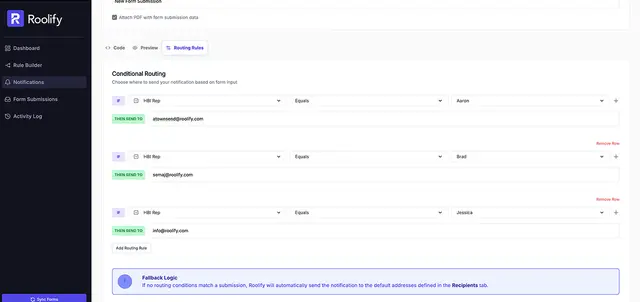
Form submissions can be sent to different recipients according to selected field values. Checkbox fields can return custom values in place of Webflow’s default true/false output. One account’s rule builder can manage logic and routing for multiple Webflow sites.
Common questions
Which permissions does Roolify ask for?
It can edit custom code and read pages, forms, sites, and your user profile.
Does Roolify suit client projects?
Agencies and freelancers managing Webflow forms are among its intended users. The rule builder can cover multiple Webflow sites from one account.
How much does Roolify cost?
Roolify has a free option as well as paid plans.
Can a checkbox return a value other than true or false?
Yes. Roolify lets checkbox fields use custom values instead of Webflow’s default true/false output.
Can one account manage forms on multiple Webflow sites?
Yes. Roolify’s rule builder manages form logic and submission routing across multiple Webflow sites from one account.