Sync Polymer Jobs to CMS with Polymer Job Boards Webflow App
Show Polymer job openings on a custom Webflow board, with job details synced to Webflow CMS.
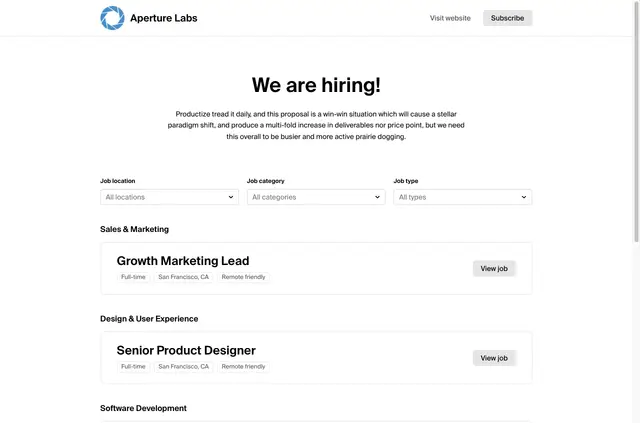
Teams building a custom Webflow job board can use Polymer Job Boards to bring Polymer openings into their site. The app connects Polymer with Webflow CMS so job information appears in Webflow collections.
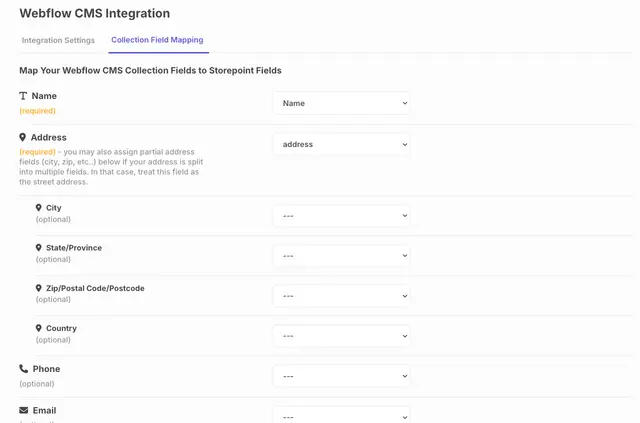
To prepare the connection, teams map Polymer job fields to the fields in their Webflow CMS collections. Examples include title, description, location, category and application URL.
Polymer Job Boards in practice
Polymer Job Boards displays Polymer postings on a custom Webflow job board or a company website. Job details are synced into Webflow CMS collections, where a team can use mapped fields such as location and application URL in its listings.
When a job is published in Polymer, the app adds it to Webflow automatically. If a job changes in Polymer, the corresponding Webflow listing is updated.
From install to first use
Install the app, then connect Polymer and Webflow CMS by mapping Polymer job fields to fields in a Webflow CMS collection. Map details such as the job title, description, location, category and application URL to the collection fields used for the board.
Once the fields are mapped, newly published Polymer jobs can be added to Webflow, and changes to jobs in Polymer update their Webflow listings.
Before you install
Polymer Job Boards is listed with a free option and paid plans. When installed, it requests permission to edit Webflow CMS and sites.
Polymer Job Boards FAQ
Which job details can I map to Webflow CMS?
Mapped fields can include job title, description, location, category and application URL.
What happens when a job changes in Polymer?
The app updates the corresponding Webflow listing when job details change in Polymer.
Are new Polymer postings added to Webflow automatically?
Yes. Newly published Polymer jobs are added to Webflow automatically.
Can I use it for a company website rather than a job board?
Yes. It can display Polymer job postings on a company website as well as a custom Webflow job board.
Which Webflow permissions does the app request?
It requests access to edit CMS and sites.