Manage Cookie Consent Categories with Okito Cookie Consent Webflow App
Add cookie categories and consent handling to your Webflow site with Okito Cookie Consent.
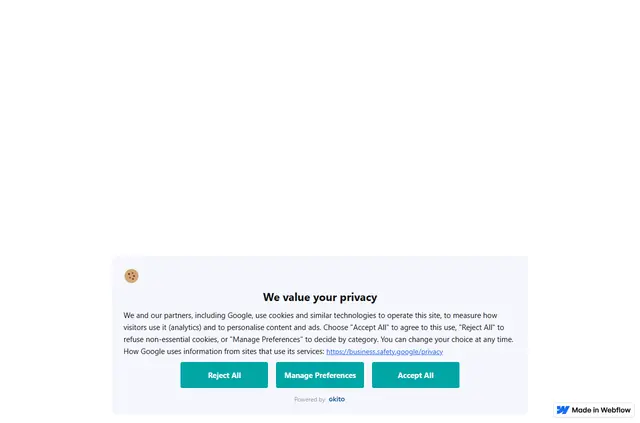
Give visitors a way to choose which cookie categories they accept. Okito Cookie Consent places a consent banner on your Webflow site and stores visitor choices and views on Okito’s servers.
After you connect a Webflow site to an Okito website and publish, Okito adds a site-wide script through Webflow’s Custom Code API. You configure the banner in Okito.
Where it fits
Okito suits Webflow site owners who need cookie categories and consent handling for privacy requirements. Cookie scans and consent records support those tasks.
The banner works with Google Consent Mode v2 in basic or advanced mode. Okito is an IAB Europe registered CMP, ID 508.
Worth checking first
The app requests permission to read sites and edit custom code. It offers scan-based script blocking; to block tracking tags in custom code, you must add an early blocker line yourself.
Each account can include one free website. Additional websites require separate paid plans, and the banner pauses when it reaches its monthly pageview limit.
Okito Cookie Consent FAQ
How do you install Okito Cookie Consent in Webflow?
In the app, sign in to Okito, authorize a Webflow site, then link it with an Okito website. Publish your Webflow site to add the script.
Where do I use Okito Cookie Consent once it's installed?
The consent banner appears on your Webflow site, while you manage its settings in Okito.
How much does Okito Cookie Consent cost?
Monthly plans are Free at $0 for 3,000 pageviews, Beginner at $7 for 75,000, Standard at $20 for 250,000, and Professional at $45 for 500,000. Enterprise has custom pricing. Each account gets one free website; additional websites need separate paid plans.
Can Okito block scripts based on its cookie scan?
Yes. Okito offers scan-based script blocking. Blocking tracking tags in custom code also requires you to add an early blocker line manually.
Does Okito support Google Consent Mode v2?
Yes. The banner supports both basic and advanced modes of Google Consent Mode v2.