Duplicate CMS Collections Across Sites with CMS Duplicator Webflow App
Copy CMS collections to another connected Webflow site, including selected items or structure alone.
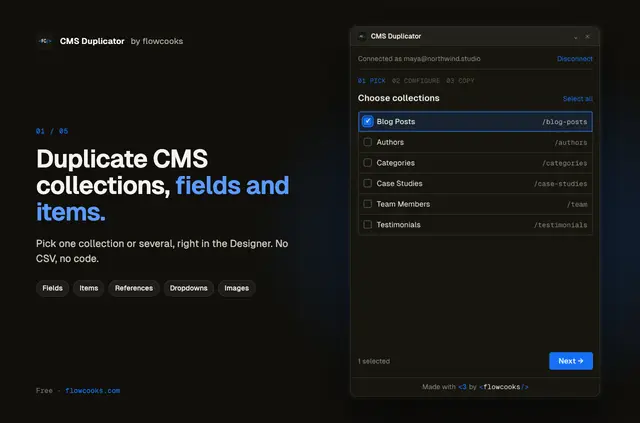
Without CMS Duplicator, moving CMS content between Webflow sites can mean rebuilding collections and copying entries by hand or using extra tools. With the app, you can manage the transfer from the Webflow Designer.
Connect a site, select collections, and choose a destination. Copy entries with the collections or transfer the collection structures without items.
What it handles
CMS Duplicator uses Webflow’s CMS API to make copies while leaving the source collections unchanged. Copy referenced collections together to preserve links between their new copies.
Where supported, dropdown choices, images, files, and item publishing status transfer too. Before copying, the app flags items or settings that will not transfer and checks destination collection names and slugs.
Things to keep in mind
You need CMS write access, and the destination must be another site you connected. Only the main language transfers; translations do not. You must restore field settings, such as character limits, manually.
For cross-site copies, files larger than 4 MB are skipped. Copies count toward the destination site’s CMS limits, and required references between copied collections become optional.
What's included
- Select multiple collections for a single copy operation.
- Transfer collection structure without copying its items.
- Preserve links between new copies when referenced collections are copied together.
- Carry over supported dropdown choices, images, files, and publishing status.
- Get warnings about items or settings that will not transfer, plus destination name and slug checks.
CMS Duplicator FAQ
Who makes CMS Duplicator?
Flowcooks is the developer behind CMS Duplicator.
How do I add CMS Duplicator to a Webflow site?
When installed, it requests permission to edit CMS content and read sites and your profile. Open it in the Designer, connect a site, then choose a destination you have connected.
Does CMS Duplicator run inside the Webflow Designer?
Yes. Open CMS Duplicator in the Webflow Designer; it uses Webflow’s CMS API.
Can I copy collections without their CMS items?
Yes. Choose to copy the collection structure without its items.
Which files are skipped when copying between sites?
Cross-site files over 4 MB are skipped.