Sync Products and Jobs from Connected Apps with Byteline Webflow App
Byteline helps ecommerce and careers teams sync Printful products or Greenhouse jobs with Webflow.
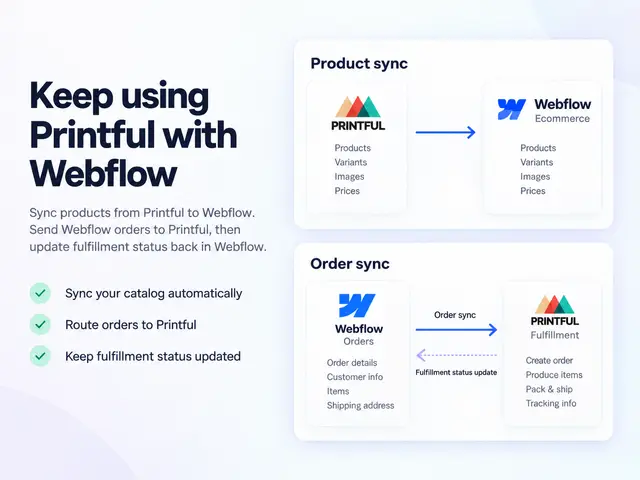
Businesses can use Byteline to manage products in Printful or jobs in Greenhouse while showing that information on a Webflow site. It connects those apps to Webflow Ecommerce or a CMS collection.
Setup involves connecting apps, choosing data, mapping fields, previewing changes and starting a sync. Settings let teams select sync direction, fields and record filters, or import existing data.
What it handles
For ecommerce projects, Byteline syncs Printful products and variants with Webflow Ecommerce. Product details, images, prices, SKUs and variants can be kept current in Webflow, and new Webflow orders are sent to Printful for fulfillment.
For careers sites, it publishes Greenhouse jobs to a Webflow CMS collection. It can add jobs, update listings and change or remove listings when roles close. Other supported connections include Google Sheets, Airtable and Notion.
Access and pricing
Byteline is listed as paid and requires a Webflow CMS plan. When installed, it requests permission to edit CMS, ecommerce and sites, and to read forms.
Questions about Byteline
Can Byteline send Webflow orders to Printful?
Yes. New orders placed through Webflow are sent to Printful for fulfillment.
Can it update jobs after they are published?
Yes. Byteline can update job listings and change or remove them when jobs close.
Can I choose which fields and records sync?
Yes. Sync settings include field selection and record filters, as well as one-way or two-way direction.
Can I bring existing data into a sync?
Yes. Byteline’s sync settings include options for importing existing data.
Which other apps can it connect to?
Along with Printful and Greenhouse, supported connections include Google Sheets, Airtable and Notion.