Generate Design System Variables with Variables Bae Webflow App
Webflow teams use Variables Bae to build design-system variables or bring them over from Figma.
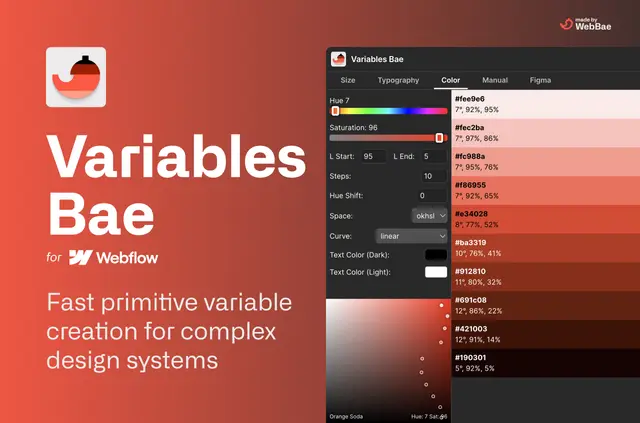
For designers and developers moving design tokens into Webflow, Variables Bae creates size, color and typography variables. It can make a system in one action, use algorithmic generation or manual batches, and connect Figma variable exports to Webflow.
Color palettes include several color spaces, hue shifts, lightness stops and accessibility checks. Size and type settings provide controls for shaping the system.
Access and pricing
The app is free, with an optional license purchase, and is listed with paid plans. Its Webflow access request is permission to read the user profile.
When it's a good fit
Variables Bae suits projects creating a variable system from the beginning or transferring variables from Figma. Size variables can be sorted into folders and assigned custom names, while typography scales can generate utility classes.
Quick answers about Variables Bae
Which color spaces can I use for palettes?
Palette choices include HSL, RGB, LRGB, OkHSL and Lab, along with hue shifts, lightness stops and accessibility checks.
What settings are available for size variables?
Size variables support minimum and maximum values, steps, easing and units. They can also be grouped in folders and given custom names.
Can I set a typography scale in rem or px?
Yes. Scales can use rem or px, and you can set the root font size. Variables Bae can also create utility classes automatically.
Can Figma imports change px values to rem?
Yes. An option in Figma variable imports converts px values to rem.
What are the ways to create variables?
Variables Bae can generate a system in one click, create variables algorithmically, or add them in manual batches.