Import CSS Variables as Tokens with Variable Importer Webflow App
Turn CSS custom properties into Webflow variables from inside the Designer.
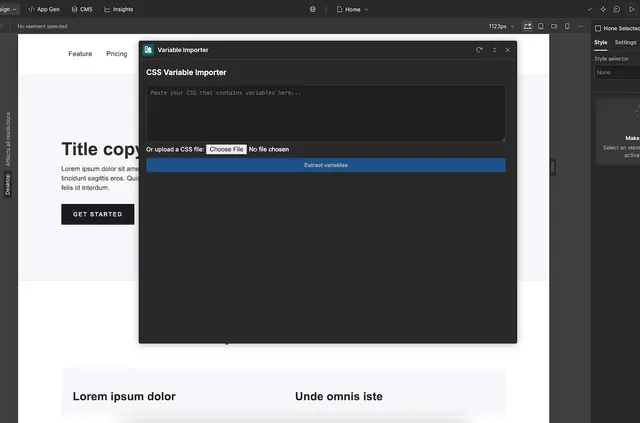
Without Variable Importer, site builders moving CSS tokens into Webflow may need to transfer them by hand or use another tool. Variable Importer lets them paste CSS or upload a file, then bring detected properties into Webflow Designer.
Made by James Mosier and listed as free, the app helps teams move design tokens, palettes, spacing scales, and typography variables into Webflow. Names can be adjusted before import, with a choice of naming formats.
Things to keep in mind
Input needs standard CSS custom property syntax, for example --var-name: value;. The values must use types Webflow supports, such as colors, numbers with units, or strings.
Variable names and values can be reviewed before import. The app adds them in a batch to a selected Webflow variable Collection.
Where it fits
The app suits teams bringing shared design tokens into Webflow projects, including color palettes, spacing scales, and typography variables. These are sets of values that can be represented as CSS custom properties and collected as Webflow variables.
What it handles
After CSS is pasted or uploaded, Variable Importer detects property names and values. Names can be converted to camelCase, PascalCase, snakecase, or kebab-case, or renamed individually.
Once reviewed, the variables are imported together into the chosen Collection in Webflow Designer. This supports moving existing CSS values into a Webflow project without entering each variable separately.
Quick answers about Variable Importer
Can I upload a CSS file instead of pasting CSS?
Yes. Variable Importer accepts pasted CSS text or an uploaded CSS file.
Which naming formats can I use?
You can convert names to camelCase, PascalCase, snakecase, or kebab-case, and rename individual variables.
Can I review variables before importing them?
Yes. You can review the detected names and values before importing.
Where do the imported variables go?
They are added in a batch to a Webflow variable Collection that you select.
What CSS values can I import?
The input must use standard CSS custom property syntax. Values need to be types Webflow supports, including colors, numbers with units, and strings.