Manage Page SEO Metadata with TurboTag Webflow App
Manage SEO metadata, page slugs, and social sharing details across your Webflow project with TurboTag.
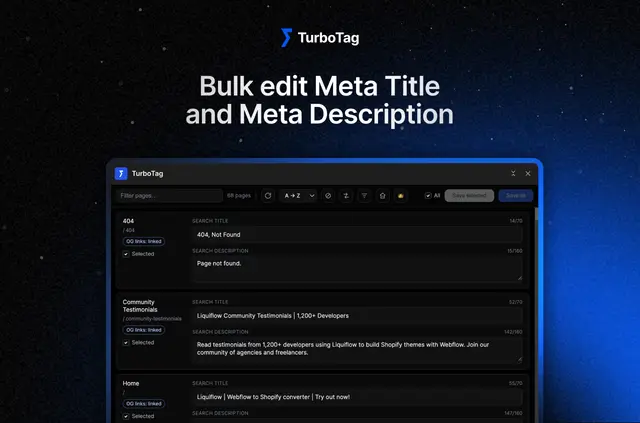
Without TurboTag, changing SEO details across a Webflow site can mean editing pages one at a time or reaching for extra tools to make batch updates. TurboTag brings page metadata work into a centralized interface in your project.
Use it to update titles and descriptions, review metadata issues, and handle social sharing settings. You can also identify draft pages and read CMS dynamic fields as tokens.
What TurboTag does
Edit meta titles and descriptions on a single page or on multiple selected pages. For bulk changes, use Find & Replace or add a prefix or suffix to titles.
TurboTag also lets you change page slugs and work with Open Graph links and images. Social titles and descriptions can follow your SEO metadata, and OG images can be applied or hidden across pages.
Feature notes
The available tools cover both metadata checks and updates across pages:
- Real-time checks flag metadata that is empty, too short, or too long; filters narrow the page list to items with issues.
- Find & Replace supports bulk changes to metadata across selected pages.
- Add a title prefix or suffix to adjust multiple page titles together.
- Set social titles and descriptions to follow SEO metadata, then apply or hide OG images across pages.
- TurboTag identifies draft pages and displays CMS dynamic fields as readable tokens.
Common questions
Can I edit metadata for more than one page at a time?
Yes. Select multiple pages to update their meta titles and descriptions. Find & Replace and title prefix or suffix tools also support batch changes.
Can TurboTag help me find pages with metadata problems?
Yes. It flags empty, short, or long metadata in real time, and filters let you focus on pages with issues.
Can social metadata use the same titles and descriptions as SEO metadata?
Yes. TurboTag can align social titles and descriptions with the SEO metadata.
Which plan options are listed for TurboTag, and who makes it?
TurboTag is made by Halbstark, with a free option and paid plans.