Generate Keyword-Targeted CMS Pages with SEOfabric Webflow App
Build keyword-focused Webflow pages, create URL slugs and send generated content to your CMS with SEOfabric.
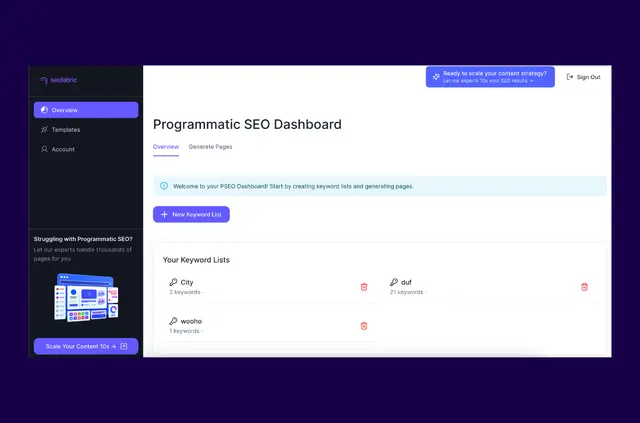
Generate pages for your Webflow site from industry keywords with SEOfabric, a content generator with programmatic SEO page creation. It sends the pages it creates to your Webflow CMS.
You can also create URL slugs for generated pages and set up templates for page generation. SEOfabric is made by Homade.
When it's a good fit
SEOfabric suits Webflow site owners who want to publish pages targeting specific keywords. Use its industry-keyword generation to create pages for a site’s programmatic SEO work.
Pricing and permissions
SEOfabric is free only. During installation, it requests permission to edit your Webflow CMS, pages and sites. These permissions cover the parts of your Webflow site the app needs access to for its page-generation workflow.
From install to first use
Install SEOfabric, then generate pages using industry keywords and send them to your Webflow CMS. You can create templates for generating pages and produce URL slugs for the pages.
A single generation run is limited to 100 pages. You can use any number of keywords and create any number of templates.
Questions about SEOfabric
How many pages can one generation run create?
Each run can generate up to 100 pages.
Can I create multiple templates?
Yes. You can create any number of templates.
How many keywords can I use?
You can use any number of keywords.
Can SEOfabric create URL slugs?
Yes. It can generate URL slugs for pages it creates.
What does SEOfabric do with generated pages?
It sends pages created from industry keywords to your Webflow CMS.