Adjust Component Images with Reframe by Small Medium Large Webflow App
For Webflow editors, marketing teams and component developers, Reframe adjusts image framing within prepared component instances.
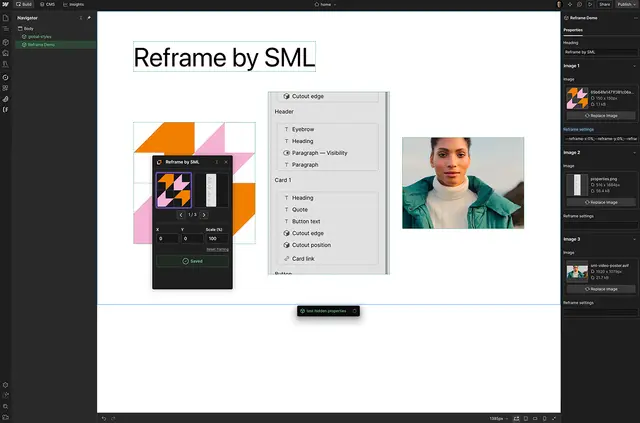
Reframe works inside Webflow Designer, where you can adjust how an image appears within a fixed frame on a component instance. The page layout stays as it is while you change the framing.
Settings are kept separately for each prepared image in each component instance. Reframe saves your changes to the image’s Reframe settings property.
Worth checking first
Reframe works only with components that have been prepared to support it. A component needs exposed image properties, matching text properties named “Reframe settings,” the right bindings and supporting CSS.
Small Medium Large image components come with the structure and configuration Reframe requires. Other Webflow component systems need developer preparation using the Reframe setup guide. The interface is in English.
Who it suits
This suits marketing teams and editors who need to adjust image composition within fixed component frames while keeping the surrounding page layout intact. It also suits developers building components for editors to use.
It can help when a component-based site uses prepared images in multiple places and each instance needs its own framing.
From install to first use
Start with a compatible component prepared for Reframe. Small Medium Large image components include what is needed; for another component system, a developer must prepare it according to the setup guide.
In Webflow Designer, select a compatible component instance and choose an image. Adjust its horizontal position, vertical position or scale using X, Y or Scale; Reframe stores the result in the image’s settings property.
Common questions
Can I use Reframe in a component system other than Small Medium Large’s?
Yes, if a developer prepares that Webflow component system to support Reframe, following the setup guide.
Can I change how large an image appears in its frame?
Yes. Reframe lets you adjust the image’s scale as well as its horizontal and vertical position.
What language is Reframe’s interface in?
The interface is in English.
Does Reframe change the surrounding page layout?
No. It adjusts image framing within a fixed component frame without changing page layout.
Who created Reframe?
Reframe was made by Marcel Deelen.