Generate Branded QR Codes with QR Code Generator Webflow App
Give Webflow projects customized QR codes, with options to shape their appearance and save them to assets.
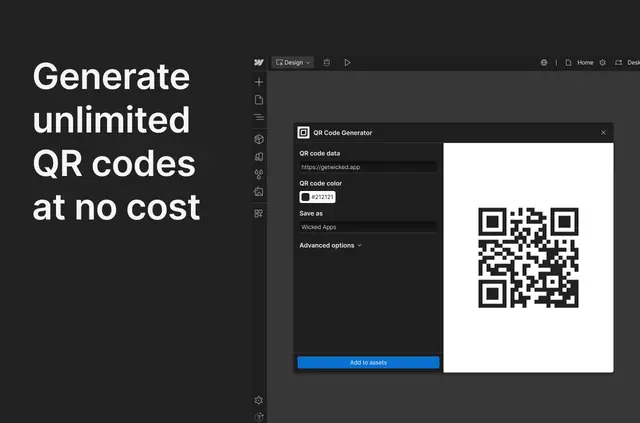
Designers, marketers and developers use QR Code Generator to make branded codes for Webflow projects. Codes are created inside Webflow, where their appearance can be adjusted.
The app is made by Shreyansh Kotak and listed as free. It supports high-resolution output for digital use and print.
The main tools
- Change code colors and select dot and corner-square styles.
- Adjust error correction levels for further control over appearance and functionality.
- Generate unlimited QR codes at no cost.
- Save generated codes directly to Webflow assets.
- Create high-resolution codes for screens or print.
QR Code Generator in practice
Within a Webflow project, the app creates QR codes and provides controls to tailor their look. A team can apply project colors, choose dot and corner-square treatments, and save the finished code to Webflow assets.
Error correction settings add another way to configure a code’s appearance and functionality. The resulting high-resolution files can be used in digital materials or for print.
Quick answers about QR Code Generator
Can the QR codes match a project’s visual style?
Yes. The app lets users change QR code colors and select styles for the dots and corner squares.
Can I adjust error correction?
Yes. Error correction levels offer additional control over the code’s appearance and functionality.
Where do generated QR codes go?
They can be saved directly to Webflow assets.
Are the QR codes suitable for print?
The app produces high-resolution QR codes for both print and digital use.
Does it cost anything to generate codes?
The app is listed as free and allows unlimited QR code generation at no cost.