Automate Order Fulfillment Workflows with Order Desk Webflow App
Order Desk helps merchants, artists, and suppliers organize orders and automate fulfillment workflows.
Order Desk does its work in its own dashboard, gathering orders from connected stores and marketplaces for routing to fulfillment services. It supports workflows spanning sales channels, suppliers, dropshipping, and print-on-demand fulfillment.
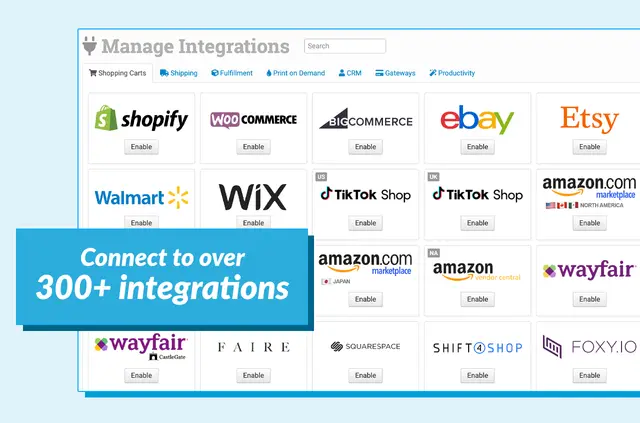
Made by Order's Workspace, the app connects with shopping carts, marketplaces, print-on-demand providers, shipping companies, CRMs, and other services. It can also sync tracking information back to sales channels.
The main tools
- Collect orders from connected stores and marketplaces in one dashboard and route them to fulfillment services.
- Set criteria in the Rules Engine to automate how orders are handled.
- Use rules to split orders, add information, filter by country, or direct items to vendors.
- Sync tracking information back to sales channels.
From install to first use
To get started, create a store, complete onboarding, and connect an integration. When installed in Webflow, the app can edit ecommerce and read site data and your user profile.
Order Desk is offered with a free option as well as paid plans.
Quick answers about Order Desk
Can Order Desk handle orders from several sales channels?
Yes. Orders from connected stores and marketplaces can be collected in one dashboard, and the app supports workflows involving multiple sales channels.
Can I use rules to send items to different vendors?
Yes. Rules can direct items to vendors, filter by country, split orders, or add information based on criteria you set.
Does Order Desk support print-on-demand and dropshipping workflows?
Yes. It supports workflows involving both print-on-demand fulfillment and dropshipping, and connects with print-on-demand providers.
Can tracking details be sent back to sales channels?
Yes. Order Desk can sync tracking information back to sales channels.