Audit and Update Open Graph Metadata with OG Sorted Webflow App
OG Sorted lets Webflow site owners review, audit and update Open Graph details across pages from one Designer panel.
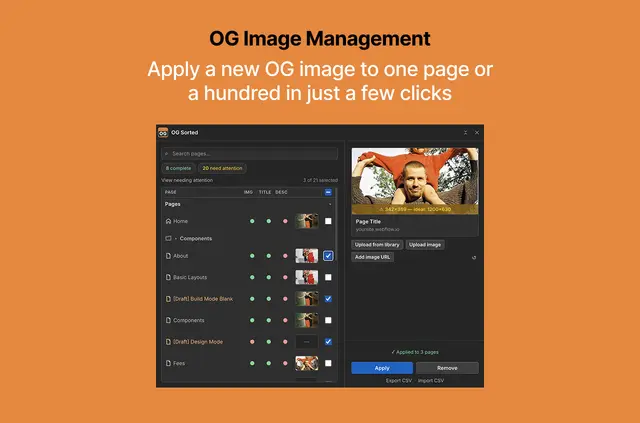
OG Sorted works inside the Webflow Designer, bringing a site's Open Graph images, titles and descriptions into a single panel. It is aimed at site owners who need to check or revise metadata across multiple pages.
Pages are arranged by type, and the folder view reflects the site's nested Webflow structure. Status indicators and filters help locate pages with incomplete Open Graph details. CMS templates that have field bindings are locked.
Setting it up
OG Sorted is listed as free and was made by Matt Evans. Open its panel in the Webflow Designer to begin reviewing page information.
Choose a page to view its details, or use the status indicators and filters to find entries that need attention.
What it handles
For each page, OG Sorted checks the Open Graph image, title and description, and provides a social card preview. It also assesses whether an image meets the recommended dimensions. In a page detail view, users can edit Open Graph text, manage images and set how SEO titles and descriptions inherit.
Images can come from Webflow Assets, a JPG or PNG upload, or a hosted image URL. To make a batch change, select multiple pages to apply or remove an Open Graph image, follow its progress and retry unsuccessful changes. CSV tools export an audit and import reviewed edits to images, text and SEO inheritance settings.
OG Sorted FAQ
Which image sources can I use?
Select an image from Webflow Assets, upload a JPG or PNG file, or enter a hosted image URL.
Can I preview how a social card will look?
Yes. The app previews social cards for pages and checks whether their images meet the recommended dimensions.
Can I change SEO title and description inheritance?
Yes. Page details include controls for SEO title and description inheritance.
Can I edit CMS templates with field bindings?
CMS templates with field bindings are locked in OG Sorted.