Find and Replace Site Content with FlowSweep Webflow App
Replace repeated Webflow text across pages and project content from an extension in Designer.
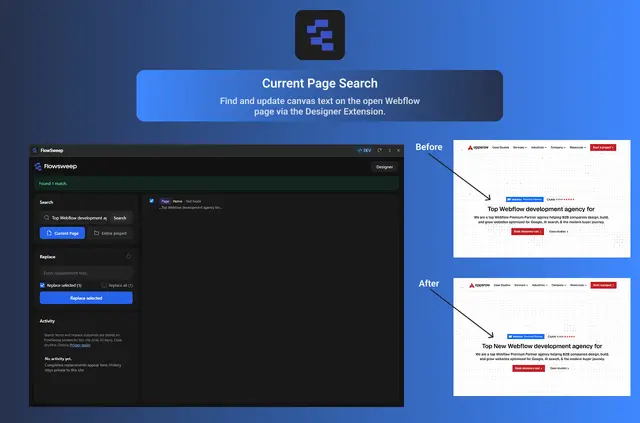
Updating the same wording across a Webflow site can mean opening pages one by one and handling CMS entries and SEO details separately. FlowSweep brings search and replace into a Designer Extension, with Webflow’s Data API supporting updates to CMS and SEO content.
Use Current Page to work with content tied to the page open in Designer, or Full Project to scan supported content across the site. You can inspect the results, select what to change, preview the edits, and apply them.
The main tools
- Search the open page’s canvas text, editable Component properties, SEO details, slug, and CMS content with Current Page.
- Use Full Project to scan site-wide CMS material, SEO and Open Graph fields, slugs, and content from the page open in Designer.
- Inspect matches, select the entries to change, preview the proposed text, and apply the replacements.
- Review recent activity and, when available, undo the latest replacement made with Current Page.
Caveats
Full Project does not edit canvas text on other pages. Open a page in Designer to change its canvas text; to edit hard-coded text inside a Component, open that Component in Designer.
The extension works with Webflow’s Data API for project content and uses Webflow OAuth for site authorization. Its requested access allows edits to CMS and pages, and reading of Components, sites, and your profile.
How setup works
Install FlowSweep from Webflow Apps & Integrations. In Designer, press E to launch the extension, then authorize the sites you want it to use. Choose Current Page or Full Project to set the search scope and begin.
Common questions
Can I undo a replacement?
FlowSweep records recent search-and-replace activity. When available, you can undo the latest Current Page replacement.
What can I do with previous search-and-replace activity?
You can review a record of recent search-and-replace actions in FlowSweep.
Is FlowSweep free to use?
FlowSweep is free to install and use unless a paid plan is introduced later.
How do Current Page and Full Project differ?
Current Page searches content tied to the open page; Full Project scans supported content site-wide.
How does FlowSweep get permission to use selected sites?
It uses Webflow OAuth to authorize the sites you choose.